

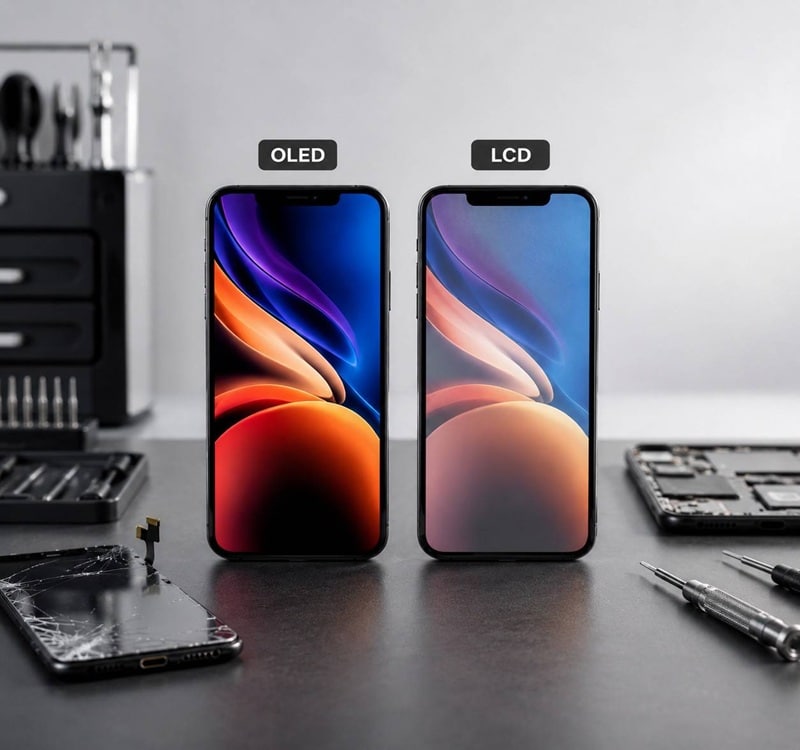
If your iPhone screen is cracked and you’re researching replacement options, you’ve probably run into two terms: OLED and LCD. The price difference between the two can be significant, sometimes $50 to $150 or more for the same iPhone model, and it’s not always clear whether the upgrade is worth it.
This guide breaks down the real differences between OLED vs LCD iPhone screens, focusing on what actually matters for repair customers: image quality, battery life, durability, cost, and long-term value. By the end, you’ll know exactly which type of screen is right for your iPhone, your budget, and your expectations.
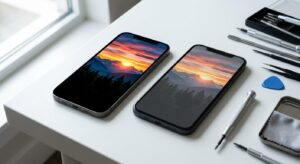
What Are OLED and LCD iPhone Screens?
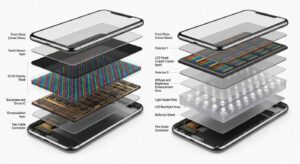
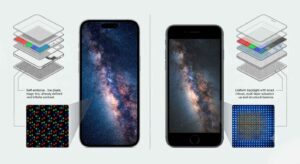
Quick Answer: OLED (Organic Light-Emitting Diode) screens produce their own light for each individual pixel, so they can turn off completely to show true black. LCD (Liquid Crystal Display) screens use a constant backlight behind the panel, which means blacks are never truly black. OLED offers better contrast, thinner design, and slightly better power efficiency. LCD is cheaper to manufacture and replace.
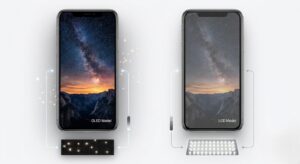
OLED is the display technology Apple introduced starting with the iPhone X in 2017 and has used in nearly every flagship iPhone since. Each pixel in an OLED display emits its own light, so when a pixel displays black, it simply turns off. This produces what reviewers and display experts at DisplayMate call “infinite contrast.”
LCD, on the other hand, is the older technology used in iPhones before the iPhone X and still found in the iPhone SE (2nd and 3rd generation) and iPhone 11 in some markets. LCDs require a backlight that is always on when the screen is active. The liquid crystal layer filters this light to create colors, but it cannot fully block it, which is why LCD blacks look grayish in dark rooms.
In simple terms:
- OLED = each pixel lights itself up
- LCD = one backlight shines through the whole screen
This core difference drives nearly every other comparison point: contrast, color accuracy, battery life, thickness, and repair cost.
Article Summary
- OLED screens deliver deeper blacks, higher contrast, richer colors, and better battery efficiency when displaying dark content.
- LCD screens are more affordable and remain a practical choice for older iPhone models originally designed with LCD technology.
- OLED replacements are the best option for iPhones that originally shipped with OLED displays because they preserve the original viewing experience.
- LCD replacements offer a cost-effective solution for budget-conscious users and older LCD-based iPhones.
- Key differences between OLED and LCD include image quality, battery life, durability, repair cost, and long-term value.
- The best screen replacement depends on your iPhone model, budget, and how you use your device every day.
Key Differences at a Glance
| Feature | OLED iPhone Screen | LCD iPhone Screen |
| Black Levels | True black (pixels turn off) | Grayish black (backlight always on) |
| Contrast Ratio | Virtually infinite | 1,000:1 to 1,400:1 (typical) |
| Color Accuracy | Wide color gamut, excellent | Good, but less saturated |
| Brightness | Higher peak brightness (HDR) | Lower peak brightness |
| Battery Efficiency | More efficient on dark content | Backlight uses constant power |
| Thickness | Thinner, allows flexible designs | Thicker, requires backlight layer |
| Viewing Angles | Excellent | Good, slight color shift at angles |
| Burn-In Risk | Possible with static images | None |
| Repair Cost | Higher (typically $100–$300+) | Lower (typically $50–$150) |
| Durability | More fragile to impact | Slightly more impact-resistant |
| Apple Usage | iPhone X and later (most models) | iPhone 8, SE 2nd/3rd gen, iPhone 11 |
OLED vs LCD iPhone Screens: A Detailed Comparison
1. Image Quality and Color
The most noticeable difference in everyday use is contrast. An OLED iPhone screen shows deeper blacks, more vibrant colors, and a wider color gamut. When you watch a video with dark scenes or use Dark Mode, the OLED is visibly better.
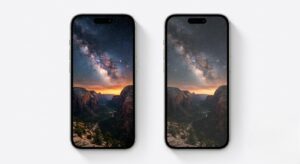
LCD screens still look good, especially on iPhones, because Apple uses high-quality IPS LCD panels. But in a side-by-side comparison, LCD blacks look washed out, and colors appear less punchy.
Practical impact: If you stream a lot of video, edit photos, or simply want your iPhone to look its best, OLED is the clear winner.
2. Battery Life
OLED screens are more power-efficient when displaying dark or black content, because black pixels are essentially turned off. If you use Dark Mode frequently, browse dark-themed apps, or use your phone in low light, OLED can save noticeable battery.
LCD screens use the same amount of power regardless of what is displayed, because the backlight is always on at a consistent level.
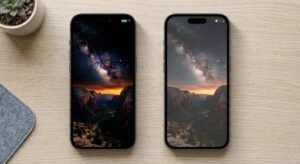
Practical impact: The difference is real but not dramatic for most users. If you already need an iPhone battery replacement, upgrading to OLED at the same time makes sense for a longer-lasting device.
3. Durability and Longevity
This is where the comparison gets nuanced.
- OLED panels are slightly thinner and more flexible, which makes them a bit more vulnerable to direct impact. They can also suffer from “burn-in,” where static elements (like the status bar) leave a faint permanent ghost image after months of heavy use. Modern iPhone OLEDs have reduced this risk significantly, but it is not zero.
- LCD panels are thicker and use more rigid glass, so they can handle a drop slightly better in some cases. They do not suffer from burn-in at all.
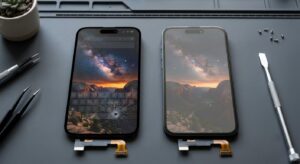
Practical impact: If you keep your iPhone for 3+ years and use it heavily, OLED burn-in is a minor long-term consideration. For shorter ownership or budget repairs, LCD is perfectly durable.
4. OLED vs LCD iPhone Screen Replacement Cost in Ocala, FL
This is often the deciding factor for repair customers.
| Feature | OLED Replacement Screen | LCD Replacement Screen |
| Typical Cost in Ocala, FL | $150–$300+ | $50–$150+ |
| Display Quality | Excellent | Good to Fair |
| Black Levels | True Blacks | Dark Gray Blacks |
| Color Accuracy | Rich and Vibrant | Less Vibrant |
| Contrast Ratio | Very High | Lower |
| Viewing Angles | Excellent | Moderate |
| Battery Efficiency | Better (especially in Dark Mode) | Lower |
| Matches Original Display | Yes (for OLED iPhones) | No (for OLED iPhones) |
| Best For | Long-term use, premium experience | Budget-conscious repairs |
| Overall Value | Higher quality, higher cost | Lower cost, reduced performance |
Actual pricing varies based on the iPhone model, screen quality, and repair provider. If your iPhone originally shipped with an OLED screen, replacing it with an LCD will result in a visible downgrade. The image will look dimmer, blacks will look gray, and colors will be less accurate. Some repair shops offer LCD “upgrades” for OLED iPhones at low prices, but this is almost always a downgrade in quality. For exact pricing by iPhone model, see our full screen repair cost guide.
5. Which iPhones Use OLED vs LCD?
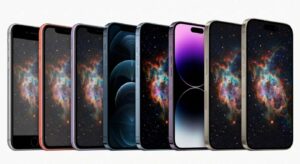
Apple’s transition to OLED was gradual:
| iPhone Model | Display Type |
| iPhone 8, 8 Plus | LCD (Retina HD) |
| iPhone X, XS, XS Max | OLED (Super Retina) |
| iPhone 11 | LCD (Liquid Retina) |
| iPhone 11 Pro, 11 Pro Max | OLED (Super Retina XDR) |
| iPhone 12 series and later | OLED (Super Retina XDR / ProMotion) |
| iPhone SE (2nd & 3rd gen) | LCD (Retina HD) |
If you have an iPhone 11 Pro, 12, 13, 14, 15, or 16, your iPhone uses OLED. Replacing it with an LCD would be a downgrade.
How to Tell If Your Replacement Screen Is OLED or LCD
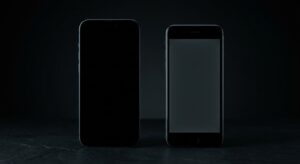
If you’ve already had a screen repair and want to verify what you received, here are three quick checks:
- True Black Test: Open an image of pure black or a completely dark app. On OLED, the screen will look completely off. On LCD, you’ll see a gray glow, especially in a dark room.
- Viewing Angle Test: Tilt your iPhone to extreme angles. OLED maintains color and contrast. LCD may show slight color shifting or dimming.
- Settings Check: Go to Settings > Display & Brightness > True Tone. True Tone is available on both, but OLED models also support HDR content in apps like Netflix and YouTube. Check whether HDR playback is available.
- Check the Model Number: In Settings > General > About, note your model number. Compare it to Apple’s official specifications on the Apple Support page to confirm your original display type.
OLED vs LCD iPhone Screen Replacement: Pros and Cons
| Type | Pros | Cons |
| OLED Replacement | True blacks, vibrant colors, better HDR, thinner, original-quality experience | Higher cost, minor burn-in risk, slightly more impact-sensitive |
| LCD Replacement | Lower cost, no burn-in risk, slightly more impact-resistant | Washed-out blacks, less accurate colors, dimmer, not suitable for OLED iPhones |
Which iPhone Screen Should You Choose for Your Repair?
The right choice depends on three factors:
Choose OLED if:
- Your iPhone originally shipped with an OLED display (iPhone X and later, except iPhone 11 and SE)
- You want the display to look and perform like new
- You watch a lot of video, edit photos, or use Dark Mode
- You plan to keep your iPhone for 2+ years
- Budget allows for a higher upfront repair cost
Choose LCD if:
- Your iPhone originally used LCD (iPhone 8, 8 Plus, SE 2nd/3rd gen, iPhone 11)
- You need the most budget-friendly repair option
- You have an older iPhone you’re using short-term
- You want a slightly more impact-resistant panel
Pro tip: Never install an LCD screen on an iPhone that originally came with OLED. The quality difference is immediately noticeable, and it will reduce the resale value of your device. If you’re unsure whether your screen needs replacing at all, check the signs it’s time for a screen replacement.
Common Mistakes to Avoid
Mistake 1: Choosing the Cheapest LCD Replacement for an OLED iPhone
This is the most common mistake repair customers make. A $70 LCD “replacement” for an iPhone 13 or 14 will look visibly worse than the original OLED. Blacks will look gray, colors will be muted, and the touch response may be slower. Always match the replacement to the original display technology.
Better approach: If your iPhone came with OLED, pay for a quality OLED replacement. The cost difference is worth it.
Mistake 2: Assuming All OLED Replacements Are the Same
Aftermarket OLED panels vary widely in quality. Cheap “soft OLED” copies may have uneven brightness, color tints, or shorter lifespans. Premium aftermarket OLEDs from reputable suppliers perform nearly as well as original Apple parts.
Better approach: Ask your repair shop which OLED panel grade they use. Look for terms like “hard OLED,” “soft OLED,” or “incell” and request a premium grade.
Mistake 3: Ignoring Burn-In Because It “Won’t Happen to Me”
Burn-in on iPhone OLED screens is rare but real, especially if you keep the same iPhone for 4+ years at high brightness. It usually shows up as a faint outline of the status bar or navigation elements.
Better approach: Use Auto-Brightness, enable True Tone, and avoid leaving static images on screen at maximum brightness for extended periods.
Mistake 4: Not Asking About Warranty
A quality OLED or LCD replacement should come with a warranty of at least 90 days, with many reputable shops offering 6–12 months. If a shop doesn’t offer a warranty, that’s a red flag.
Better approach: Always ask about warranty coverage before approving a repair.
Mistake 5: Forgetting About Other Damage
A cracked screen often coincides with other issues, like a weakened back glass or a battery that’s been through the same drop. Bundling repairs can save time and money.
Better approach: Ask your technician to inspect your iPhone for related damage. Many shops offer combined pricing on iPhone Back Glass Repair and screen replacements done at the same time.
Real-World Example: Choosing the Right Screen
Scenario 1: iPhone 12 with a Cracked Screen
The iPhone 12 uses OLED. The owner is a college student who streams a lot of video and uses Dark Mode. Repair budget is moderate. Recommendation: OLED replacement. The cost is higher, but the display quality matches the original, and the iPhone will look and feel like new.
Scenario 2: iPhone SE (3rd Gen) with a Cracked Screen
The iPhone SE uses LCD. The owner uses the phone primarily for calls, texts, and occasional browsing. Budget is tight. Recommendation: Quality LCD replacement. There’s no need to pay for OLED on an iPhone that never had it, and the user won’t notice the difference in their usage pattern.
Scenario 3: iPhone 13 Pro with a Cracked Screen and a Year-Old Battery
The iPhone 13 Pro uses OLED with ProMotion (120Hz). The battery health is at 82%. The owner plans to keep the phone another 2+ years. Recommendation: OLED replacement plus a battery replacement at the same time. This restores both display quality and battery life in a single repair visit.
Frequently Asked Questions
Is OLED better than LCD for iPhone?
Yes, OLED is objectively better in picture quality. It produces true blacks, higher contrast, more accurate colors, and better HDR performance. However, LCD is still a good display, especially for budget iPhones like the SE. For repair purposes, always match the replacement to the original display type.
Why are OLED iPhone screen replacements more expensive?
OLED panels are more complex and expensive to manufacture than LCD panels. Each pixel contains organic compounds that emit light individually, which requires precise engineering. LCDs use a simpler backlight-and-filter design that has been mass-produced for decades. This manufacturing cost difference is passed on to the consumer.
Can I replace an OLED iPhone screen with an LCD?
Technically, yes, but it is not recommended. The image quality will be noticeably worse, and your iPhone will not look or perform as it did originally. If budget is a concern, consider a quality aftermarket OLED panel instead, or ask your repair shop about payment plans.
Does OLED improve battery life on iPhone?
OLED can improve battery life, but only when displaying dark or black content. If you use Dark Mode and dark-themed apps frequently, an OLED screen will use less power than an LCD would displaying the same content. For typical mixed usage, the difference is modest.
How can I tell if my replacement iPhone screen is OLED or LCD?
The easiest test is the “true black” check. Open a pure black image in a dark room. OLED will look completely off, while LCD will show a faint gray glow. You can also check your original model specifications on Apple’s support site to confirm what your iPhone should have.
Which iPhone screen lasts longer, OLED or LCD?
LCD screens typically last longer in terms of image retention, since they don’t suffer from burn-in. OLED screens can last many years without burn-in under normal use, but heavy use at high brightness over 3–4 years may cause minor image retention. For most users, both technologies will outlast their ownership of the device.
Conclusion
Choosing between OLED vs LCD iPhone screens comes down to your iPhone model, your budget, and your expectations.
Three key takeaways:
- Always match the replacement to the original display type. If your iPhone came with OLED, replace it with OLED. If it came with LCD, a quality LCD replacement is perfectly fine.
- OLED offers better image quality, contrast, and battery efficiency on dark content. LCD is cheaper and slightly more impact-resistant, but cannot match OLED’s picture quality.
- Don’t choose based on price alone. A cheap LCD on an OLED iPhone is a downgrade, not a savings. Invest in a quality replacement, and confirm the warranty before approving the repair.
If your iPhone needs a screen replacement in Ocala, FL, make sure you know exactly what you’re getting before approving the repair. At Phone Fashion Fix, we clearly explain whether your replacement screen is OLED or LCD, the quality grade of the panel, and the warranty included with the service. Our goal is to help you make an informed decision and restore your iPhone to the best possible condition. And also concerned about Face ID after a screen replacement? See our full guide.