

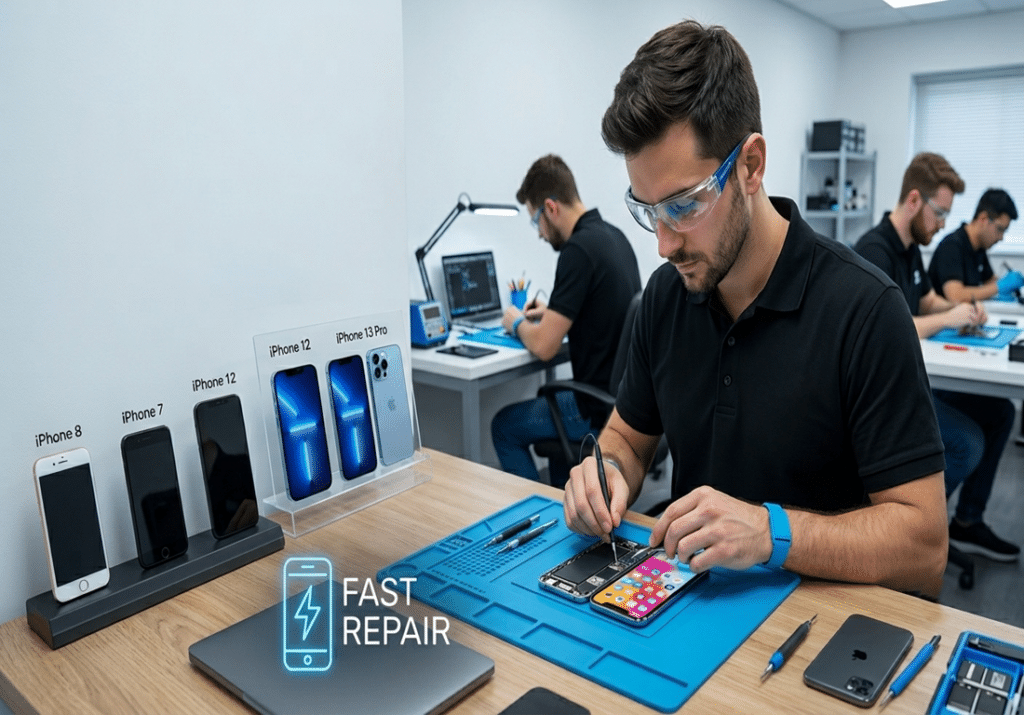
Most iPhone screen repairs take 20–60 minutes at a local repair shop, 1–3 hours at an Apple Store with an appointment, and 5–10 business days through mail-in repair services. If you’re wondering “how long does iPhone screen repair take,” the answer depends on several factors, including your iPhone model, screen availability, and whether additional calibration such as Face ID or True Tone programming is required.
Below is a detailed breakdown of iPhone screen replacement times by model, repair provider, and real-world repair scenarios so you know exactly what to expect before scheduling a repair.
Quick Answer
- Local repair shop: 20–60 minutes
- Apple Store: 1–3 hours
- Authorized service provider: 1–3 hours
- Mail-in repair service: 5–10 business days
Most iPhone screen repairs can be completed the same day when replacement parts are available.
What Factors Affect iPhone Screen Replacement Time?

Several variables influence iPhone screen replacement time, including your iPhone model, display technology, parts availability, repair provider, and whether additional calibration is required after installation.
- iPhone model: Repair complexity varies by model. Devices with advanced display features, Face ID components, and additional calibration requirements may take longer to repair than older models.
- Type of damage: A hairline crack on the glass is faster to address than a fully black display with unresponsive touch, since the latter may indicate deeper logic board issues.
- Parts availability: If a shop doesn’t have your specific screen in stock, you’ll wait days for an order. This is the single most common cause of delayed repairs.
- Repair provider type: Apple Stores often require appointments and run diagnostics. Local repair centers typically complete repairs while you wait.
- Technician workload: Peak times (lunch hours, weekends, post-holiday periods) can extend wait times even at fast shops.
- Screen technology: OLED screens often require additional testing and calibration after installation, especially on newer iPhone models. Older LCD-based devices such as the iPhone XR and iPhone 11 are generally quicker to repair because they require fewer calibration steps.
- Face ID recalibration: If the original Face ID module is being transferred to a new screen, the technician must recalibrate it. Skipping this step can permanently disable Face ID, so it’s a non-negotiable part of quality repair.
Apple uses OLED (Organic Light Emitting Diode) displays across the iPhone 12, 13, 14, 15, and 16 lineup to deliver deeper blacks, higher contrast, and more accurate colors. In contrast, older models such as the iPhone XR and iPhone 11 use LCD displays. As a result, technicians often need to perform additional setup after replacing an OLED display, especially for features like Face ID and True Tone. Consequently, these extra calibration steps can slightly increase the overall repair time, depending on the iPhone model and the technician’s repair process.
However, many people mistakenly assume that all iPhone screens are interchangeable. In reality, each iPhone model requires a compatible display. If a technician installs the wrong screen type, you may lose Face ID functionality or end up with a dim, washed-out display. Therefore, always confirm your exact iPhone model before approving any screen repair to ensure proper compatibility and performance. If you’re not sure whether your screen needs replacing at all, review the signs it’s time for a screen replacement.
iPhone Display Repair Time by Model
Repair times vary across iPhone generations because each model uses different display technology. For example, newer iPhone models with OLED displays and ProMotion technology require technicians to perform more careful calibration. As a result, these repairs usually take longer than repairs on older iPhone models with LCD displays.
In addition, True Tone automatically adjusts your iPhone’s display color temperature based on the surrounding light. After replacing the screen, technicians must reprogram or calibrate the True Tone feature to ensure it works correctly with the new display. Therefore, this additional step can slightly increase the overall repair time.

iPhone screen repair times by model
| iPhone Model | Typical Repair Time | Notes |
| iPhone 16 Pro Max | 30–60 Minutes | Additional display setup and sensor checks required |
| iPhone 16 Pro | 30–60 Minutes | Advanced display calibration required |
| iPhone 16 Plus | 20–45 Minutes | Similar repair process to iPhone 16 |
| iPhone 16 | 20–45 Minutes | Parts availability is important |
| iPhone 15 Pro Max | 30–60 Minutes | OLED calibration and testing required |
| iPhone 15 Pro | 30–60 Minutes | OLED screen replacement and calibration |
| iPhone 15 | 20–45 Minutes | Popular repair with widely available parts |
| iPhone 14 Pro | 30–60 Minutes | Extra display verification required |
| iPhone 14 Plus | 20–45 Minutes | Similar repair process to iPhone 14 |
| iPhone 14 | 20–45 Minutes | OLED display replacement |
| iPhone 13 Pro | 30–60 Minutes | OLED display configuration required |
| iPhone 13 | 20–45 Minutes | Fast repair when parts are in stock |
| iPhone 12 Pro | 30–60 Minutes | OLED display replacement |
| iPhone 12 | 20–45 Minutes | Parts are readily available |
| iPhone 11 Pro | 30–60 Minutes | OLED display replacement and testing |
In general, newer iPhone Pro models take 10 to 15 minutes longer to repair than base models because technicians must transfer the Face ID module and perform True Tone calibration. However, if your iPhone is covered by AppleCare+, Apple may provide the best option for guaranteed quality. On the other hand, if you need the fastest turnaround, a local Ocala repair shop with the required parts in stock can usually complete the repair more quickly.
Popular models such as the iPhone 12 and iPhone 13 typically have excellent parts availability, allowing many repair shops to complete screen replacements quickly.
iPhone Display Replacement Time by Provider Type
Your choice of repair provider has the biggest impact on how long you’ll be without your phone. Here’s how the main options compare in practice.

- Apple Store / Apple Authorized Service Provider: Apple screen repair time typically ranges from 1 to 3 hours when you visit an Apple Store or Apple Authorized Service Provider and the required display is in stock. If replacement parts need to be ordered, the repair may take several additional business days.
- Local repair shops: Walk-in welcome, no appointment needed. Most iPhone glass repairs are completed in 20 to 45 minutes while you wait.Many local repair shops keep screens for popular iPhone models in stock, which can significantly reduce repair wait times.
- Mail-in services (Apple, third-party): Expect 5 to 10 business days total, including shipping time both ways. This is the slowest option and only makes sense if you’re not in a hurry or no local options are available.
Repair Time by Damage Type
The severity of the damage can affect how long an iPhone screen repair takes. Technicians can usually replace a simple cracked iPhone screen in under an hour, but additional hardware damage often increases the total repair time.
| Damage Type | Typical Repair Time |
| Minor Screen Crack | 20–30 Minutes |
| Shattered Screen | 30–45 Minutes |
| Black Screen / No Display | 30–60 Minutes |
| Bent Frame + Screen Damage | 1–3 Hours |
| Water Damage with Screen Issues | Several Hours |
When Can Your iPhone Be Fixed the Same Day?
Same day iPhone screen repair is available in many cases, provided the repair shop has the correct replacement screen in stock and the damage is limited to the display. Local repair providers can often complete the repair while you wait.
When same-day repair is possible:
- The repair shop has your specific iPhone screen in stock
- The damage is limited to the screen (no frame bending or internal damage)
- You arrive during business hours and the technician has availability
- You’re working with a local independent shop that performs repairs on-site
When same-day repair is not possible:
- Severe frame damage — the housing may need to be replaced alongside the screen
- Older or less common models where parts must be special-ordered
- Mail-in repair services (by definition, these take multiple days)
- Providers that send devices to off-site repair centers rather than working in-house
What Happens During an iPhone Screen Repair?

Knowing what actually happens during the repair can help you feel confident in the process and prepare accordingly. Here’s a realistic step-by-step breakdown.
- Diagnostic inspection (3–5 minutes): The technician examines your iPhone to confirm the screen is the only issue and that touch, display, and Face ID functions need to be tested post-repair.
- Device preparation: You’ll be asked to disable Find My iPhone and confirm your Apple ID. This protects your data and allows the technician to test the device after repair.
- Screen removal: The technician powers down the iPhone, removes the damaged screen, and cleans residual adhesive from the frame.
- New screen installation: The replacement screen assembly is connected, including the front camera, earpiece, and sensor cables.
- Face ID and True Tone calibration: For OLED models, the Face ID module is transferred and calibrated, and True Tone is programmed to the new display.
- Functionality testing: Touch response, display brightness, color accuracy, Face ID, and proximity sensor are all verified.
- Final quality check: The technician runs through the full checklist before returning the device to you.
In most cases, technicians complete the actual screen replacement in just 15 to 30 minutes. After that, they perform diagnostics, calibrate essential features, and thoroughly test the device to ensure everything works correctly. As a result, an experienced repair shop can often finish the entire process in less than an hour.
Expert Insight
According to experienced repair technicians, technicians usually replace an iPhone screen in less than 30 minutes. However, they often spend additional time running diagnostics, testing the device, performing calibration, and verifying that features like Face ID and True Tone work properly after the repair. As a result, these essential quality checks can extend the total repair time.
How to Reduce Your Repair Wait Time
A few simple steps before you arrive can shave meaningful time off your repair visit.
- Back up your iPhone: Use iCloud or connect to a computer and back up via Finder or iTunes before you arrive.
- Disable Find My iPhone: This is required before any technician can run post-repair diagnostics.
- Know your Apple ID and passcode: Technicians need this to verify functionality after the repair.
- Call ahead to confirm parts: If you’re planning an Apple Store screen replacement, schedule your appointment in advance and confirm that your iPhone model’s display is available before visiting. This helps avoid unnecessary delays.
- Choose a walk-in friendly local shop: Phone Fashion Fix in Ocala welcomes walk-ins and completes most repairs while you wait.
- Skip mail-in if time matters: Mail-in repairs add 5 to 10 business days of shipping time on top of the actual repair.
A better way to think about it is this: the more prepared you are when you walk in, the faster you walk out. Even a few minutes saved on data prep and confirmation can make the difference between a 30-minute and 60-minute visit.
Common Mistakes That Delay Screen Repairs
Most repair delays aren’t the shop’s fault, they come from avoidable oversights on the customer’s end. Here are the most common mistakes that extend repair time.
- Not backing up data beforehand: If something goes wrong during repair, a recent backup is your safety net. Without one, you’ll spend time on-site creating one before the technician can proceed.
- Waiting too long to repair: A small crack spreads. Moisture and dust get under the glass. What could have been a 30-minute screen swap becomes a longer repair with additional complications.
- Walking into Apple without an appointment: Apple Stores regularly turn away walk-ins for screen repairs or book them days out. Peak times (lunch, weekends, holidays) make this worse.
- Choosing the cheapest aftermarket screen: Low-quality aftermarket screens often fail within weeks, forcing a re-repair. Genuine Apple parts or high-grade OEM equivalents last longer and perform correctly.
- Not asking about warranty: A reputable repair shop stands behind their work. If a shop can’t clearly explain their warranty terms, that’s a red flag.
- Ignoring Face ID issues before repair: If Face ID is already glitchy before the screen swap, a proper technician will flag it. Ignoring it can lead to confusion about whether the repair caused the issue.
In practice, the most expensive repair mistakes usually start with the cheapest quote. A $30 cheaper screen that fails in two months ends up costing more than a quality replacement done right the first time.
How to Choose the Right iPhone Repair Provider
Choosing a repair provider involves more than simply finding the lowest price.
Evaluate These Factors
Parts Quality
Ask whether the provider uses Genuine Apple Parts or high-quality aftermarket alternatives.
Warranty Coverage
A warranty demonstrates confidence in the repair.
Repair Time
Look for realistic turnaround estimates rather than vague promises.
Price Transparency
Reputable providers clearly explain costs before work begins.
Reviews and Reputation
Check local customer reviews and ratings.
Technician Experience
Experienced technicians generally diagnose and repair issues more efficiently.
Apple vs. Authorized vs. Local Shops
| Provider | Speed | Cost | Convenience |
| Apple Store | Moderate | Higher | Appointment often required |
| Authorized Provider | Moderate | Moderate to High | Appointment common |
| Local Repair Shop | Fast | Often lower | Walk-in friendly |
When comparing providers, look for a repair shop with experienced technicians, quality parts, transparent pricing, and realistic turnaround times.
FAQs on How Long Does iPhone Screen Repair Take
How long does Apple screen repair take?
Most local repair shops complete apple screen repairs in 20 to 60 minutes. In comparison, Apple Stores usually finish the same repair within 1 to 3 hours. However, if you choose a mail-in repair service, the entire process typically takes 5 to 10 business days.
How long does an Apple Store screen repair take?
In most cases, Apple Store technicians complete iPhone screen repairs within one to three hours when they have the required parts in stock. However, if they need to order replacement parts, the repair process can take several business days.
Can an iPhone screen be replaced in 30 minutes?
Yes. In fact, many local repair shops can complete a standard iPhone screen replacement within 20–45 minutes, provided they have the correct replacement screen in stock. As a result, you can often get your iPhone repaired and back the same day.
Does Face ID make repairs take longer?
Sometimes, technicians need extra time to complete additional testing and calibration after the repair. As a result, they can verify that the sensors, Face ID, and other critical components function correctly before returning your iPhone.
Are newer iPhones slower to repair?
Not necessarily. Although newer iPhone models with OLED displays require additional calibration, professional technicians can still complete most screen repairs within about an hour. As a result, the extra calibration rarely adds significant repair time.
Is same-day screen repair common?
Yes. Most local repair shops and many authorized service providers complete iPhone screen repairs the same day when they have replacement parts in stock. That means you can often get your iPhone back without waiting until the next day.
Can I use my iPhone immediately after a screen repair?
Yes. In most cases, you can use your iPhone immediately after the repair. The technician performs a final quality check by testing the display, touch responsiveness, Face ID, and other essential functions before returning the device.
What is the fastest way to repair a cracked iPhone screen?
Call ahead, verify inventory, back up your phone, and choose a walk-in repair provider with a strong reputation for fast turnaround times.
Conclusion
If you’re still wondering how long does iPhone screen repair take, most repairs are completed within 20–60 minutes at a local repair shop when replacement parts are available. Apple Store repairs typically take 1–3 hours with an appointment, while mail-in services can take 5–10 business days. Ultimately, repair time depends on your iPhone model, parts availability, and the repair provider you choose.
Three things to remember:
- Fast same-day service is now common at most walk-in repair shops.
- Newer OLED Pro models may take slightly longer because of additional display setup and sensor programming, but the difference is usually under 15 minutes.
- Preparation (backup, Apple ID, calling ahead) can save you 15 to 30 minutes on your visit.
Need iPhone screen repair in Ocala? Phone Fashion Fix offers same-day screen replacement for many iPhone models, with most repairs completed in 20–45 minutes when parts are available. Contact the team to confirm screen availability and estimated repair time before visiting. For pricing details, see our complete iPhone screen repair cost guide.