

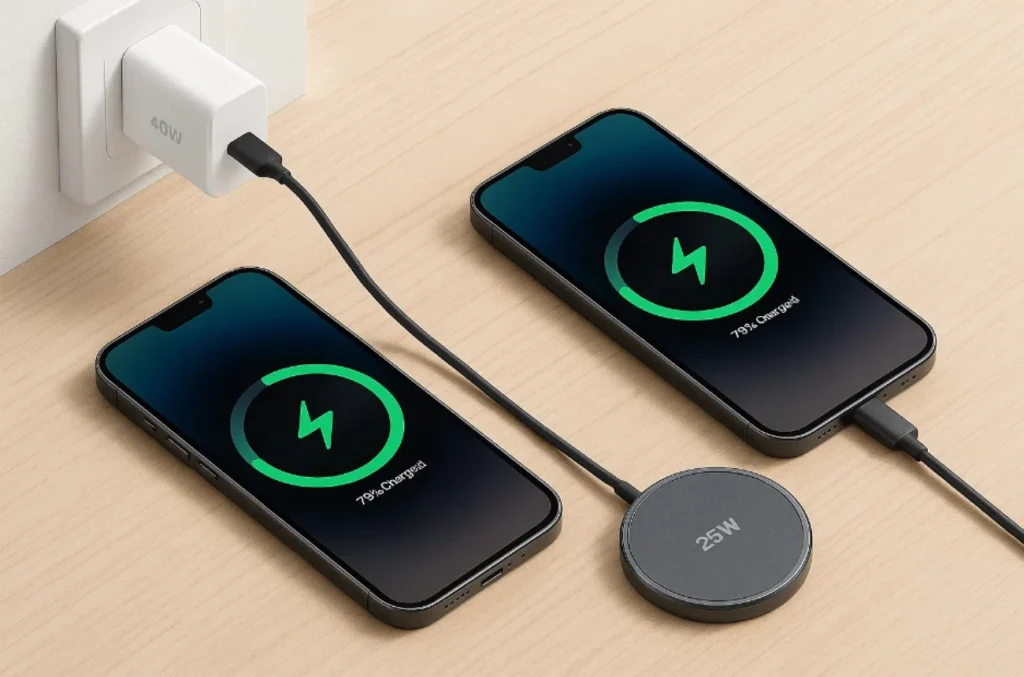
The best charging habits for iPhone users can adopt: let Optimized Battery Charging run in the background, set a Charge Limit if your phone stays plugged in for long stretches, and avoid extreme heat above all else.
Overnight charging isn’t a problem, iPhone stops automatically once full. A certified charger and avoiding frequent full drains round out the rest.
Optimized Battery Charging is a built-in iOS feature that learns your daily routine and delays charging past 80% until shortly before you typically unplug, cutting the time your iPhone spends sitting at full charge.
Most charging advice leans on manual percentage rules borrowed from general battery care. What often gets left out: iOS already automates most of this.
How iPhone Charging Actually Works
An iPhone charges in two phases. It fast-charges up to roughly 80%, then switches to a slower “trickle charge” for the rest. This isn’t a limitation it’s a deliberate design choice.
A battery warms up as current flows into it, and heat is one of the biggest contributors to long-term capacity loss. Slowing the rate near full reduces heat buildup exactly where it matters most.
How does an iPhone charge its battery? It fast-charges to about 80%, then shifts to a slower trickle-charge phase for the rest reducing heat and preserving long-term battery health.
This ties into chemical aging. Per Apple’s support documentation, a battery’s lifespan depends on its chemical age a mix of temperature history and charging pattern, not just calendar time. As batteries chemically age, they hold less charge and deliver less peak power. That’s why two iPhones of the same age can have very different battery health depending on how they were charged.
One common misread: people assume slower charging near 100% means something’s broken. In practice, that slowdown is expected behavior, not a fault.
Let Optimized Battery Charging Do the Work
Optimized Battery Charging is on by default. For most people, it’s already doing the heavy lifting no manual input needed.
The feature uses on-device machine learning to study your routine. Once it has enough data, it delays charging past 80% and times the final charge to finish close to when you usually unplug.
What does Optimized Battery Charging do? It delays charging past 80% based on your learned routine, then finishes shortly before you typically unplug reducing time spent at full charge.
It needs a routine to work well. Per Apple’s support documentation, it needs at least 14 days to learn your habits, plus roughly nine charging sessions of five hours or more in the same location. This is why frequent travelers often see it activate less inconsistent locations mean less data to learn from.
Think of it as a background safety net, not something to check daily. Confirm it’s active in Settings > Battery > Charging (iPhone 15+) or Battery Health & Charging (iPhone 14 and earlier). A “fully charged by” message on the Lock Screen means it’s working as intended.
Should You Set a Charge Limit? (iPhone 15 and Later)
iPhone 15 and later include a Charge Limit slider cap charging anywhere from 80% to 100%, in 5% increments, right in Settings.
Should I set a charge limit? It’s worth using if your phone stays plugged in for long stretches overnight, or at a desk all day. For most people who unplug daily and carry their phone around, 100% with Optimized Battery Charging active is already enough.
Apple’s system sometimes suggests a specific number, like “a charge limit of 95% is recommended to help preserve your battery” based on your actual usage data, so it’s reasonable to follow.
One quirk: even below 100%, iPhone will occasionally charge to 100% anyway, to keep the percentage readout calibrated. Expected behavior, not a bug.
iPhone 14 and earlier skip the slider entirely just an on/off toggle for Optimized Battery Charging. Older-device owners rely entirely on the automated feature.
| Feature | iPhone 15 and Later | iPhone 14 and Earlier |
| Charge Limit control | Slider, 80–100% in 5% increments | Not available |
| Optimized Battery Charging | Toggle, works alongside Charge Limit | Toggle only |
| Settings location | Battery > Charging | Battery > Battery Health & Charging |
| Rated cycles for 80% capacity | 1,000 cycles | 500 cycles |
| Manual override for full-charge time | Yes, via Charge Limit | No, automation-only |
The Manual Habits That Still Matter
Even with automation running, a few manual habits still make a measurable difference though they matter less than they used to.
Is the 20-80% rule still necessary? It’s a helpful backup habit, not a strict requirement, since Optimized Battery Charging and Charge Limit already cut time at full charge for most iPhone 15+ users. Some sources say 20-80%, others 40-80% neither is an official Apple number, so treat any specific range as general guidance rather than an iOS-enforced rule.
What Apple’s documentation does specify is charge cycle count one cycle completed each time you use 100% of battery capacity, whether in one sitting or across several partial charges.
How many charge cycles does an iPhone battery last? iPhone 14 and earlier are rated to retain 80% of original capacity at 500 cycles. iPhone 15 and later are rated for 1,000 cycles double the longevity, per Apple’s published battery documentation.
A frequent mistake: letting the battery hit 0% regularly before recharging. Deep discharges stress the battery more than partial ones.
What percentage should I keep it at? No strict target on modern iPhones Optimized Battery Charging and Charge Limit already manage most of this. As a backup habit, just avoid frequent 0% drains and long all-day sits at 100% without a charge limit set. Keeping iOS updated matters too, since Apple periodically refines battery management through software updates.
Heat Is the Real Enemy — Not Overnight Charging
One persistent myth: overnight charging damages the battery. Not accurate and it distracts from what actually matters: temperature.
Is it bad to charge overnight? No. iPhone stops charging once full and only resumes below 95%, so overnight charging is safe on its own. Heat exposure during charging is the bigger factor, not duration.
Per Apple’s support documentation, iPhone performs best between 62°F and 72°F (16°C–22°C). Charging above 95°F (35°C) can permanently reduce battery lifespan. Slowing the charge rate near full is partly a response to this same heat sensitivity batteries generate more heat the closer they get to full.
Riskier than an overnight charge:
- Charging on a car dashboard in direct sun during a Florida summer afternoon
- Leaving a phone plugged in on a patio table in direct heat
- Charging inside a thick case that traps heat, especially wirelessly
Cold weather matters less. Low temperatures can temporarily reduce performance, but this typically resolves once the device warms back up not the permanent damage heat causes.
Charging Accessories: MagSafe, Qi, and Certified Cables
Your charger and cable affect charging speed and, indirectly, long-term battery health.
Third-party cables and adapters are safe if they’re MFi-certified (Lightning) or USB-C/PD-compliant. Non-certified, low-quality chargers are more likely to deliver inconsistent power or generate excess heat.
MagSafe and Qi-certified wireless chargers are both safe but wireless charging tends to run slightly hotter than a wired connection, since coil-based energy transfer is less efficient. That doesn’t mean avoid it; it means the same heat-avoidance habits (no thick case, no direct sun, good ventilation) matter more with wireless setups.
A damaged or frayed cable is worth replacing immediately increased resistance at a bad connection generates heat that works against everything trickle charging is designed to prevent.
Common iPhone Charging Mistakes
What are the most common mistakes? Charging in direct heat, using uncertified chargers, letting the battery hit 0% repeatedly, disabling Optimized Battery Charging, and wireless charging with a thick case still on.
| Mistake | Why It Hurts Battery | Better Habit |
| Charging in a hot car or direct sunlight | Accelerates chemical aging above 95°F (35°C) | Charge in shade or indoors |
| Using non-certified, low-quality chargers | Inconsistent power, excess heat at the connection | Use MFi-certified or USB-C/PD-compliant chargers |
| Letting the battery repeatedly drop to 0% | Deep discharges add more stress than partial cycles | Charge before it hits critically low |
| Turning off Optimized Battery Charging | Removes the main automated protection | Keep it enabled by default |
| Wireless charging with a thick case on | Traps heat from the less efficient wireless process | Remove thick cases, or charge wired |
Signs Your Battery Needs Professional Attention
Good habits slow battery wear they don’t stop it. Every lithium-ion battery is a consumable part that degrades over time. At some point, habits alone won’t fix a battery that’s genuinely worn out.
When should I get it checked? A Battery Health reading below 80%, unexpected shutdowns despite remaining charge, rapid drain that doesn’t match normal use, or a phone that feels warm during normal (non-charging) use.
Check current health under Settings > Battery > Battery Health (iPhone 15+) or Battery Health & Charging (iPhone 14 and earlier). A “Service” message next to Battery Health is Apple’s own signal that the battery has degraded enough to affect performance.
If you’re seeing any of these signs, a professional battery replacement check is faster than continuing to adjust habits that may no longer be enough to compensate for a genuinely worn-out battery.
FAQs
Is it bad to charge my iPhone to 100% every day?
Not inherently. With Optimized Battery Charging active, iPhone minimizes actual time spent at 100%, so daily full charges aren’t the concern they once were.
Does wireless charging damage the battery faster than wired?
Wireless charging runs somewhat hotter due to coil-based energy transfer. Heat is the real factor in wear, not the charging method itself.
Why is my iPhone charging slowly?
Usually a charger or cable that doesn’t support fast charging, a cold battery, or the normal trickle-charge phase past 80%.
What’s a good battery health percentage?
Apple doesn’t publish a hard cutoff, but a reading below roughly 80% is a common point where people start considering replacement.
Can I use any charger for my iPhone?
Any MFi-certified or USB-C/PD-compliant charger is safe. Uncertified, low-quality chargers carry higher risk of inconsistent charging or overheating.
How do I turn on Optimized Battery Charging or set a Charge Limit?
Settings > Battery > Charging (iPhone 15+), or Battery Health & Charging (iPhone 14 and earlier).
Conclusion
Charging an iPhone well comes down to three things: let Optimized Battery Charging handle most of the work, treat heat as the real risk instead of overnight charging, and use a charge limit or certified accessories where they genuinely apply. None of this requires constant percentage-watching iOS already does that.
If you’ve followed these habits and your battery health still isn’t where it should be, that’s no longer a charging-habit problem. Check your Battery Health reading in Settings and if it’s degraded, a professional battery health check can confirm whether a replacement makes sense before it becomes a bigger issue.