

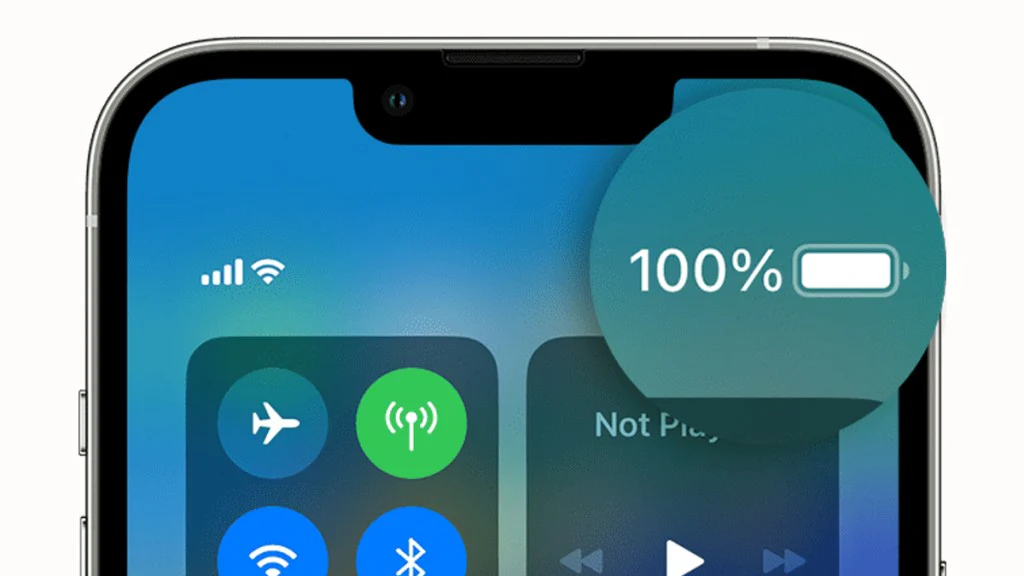
Most answers to the question “How long do iPhone batteries last?” stop at a vague “it depends.” That’s technically true, but it doesn’t help you figure out whether your own iPhone is behaving normally or heading toward replacement territory.
Here’s the more useful version: iPhone batteries typically last around 2–3 years of daily heavy use before capacity drops enough to notice, based on Apple’s own 500-cycle rating. But that number shifts depending on which iPhone you own, how you charge it, and what you use it for. This guide walks through the real numbers by model, what actually shortens battery life day to day, and provides a clear framework for deciding whether to replace the battery or move on.
How Long Do iPhone Batteries Last?
Most iPhone batteries retain up to 80% of their original capacity for roughly 500 full charge cycles, which works out to about 2–3 years of typical daily use before replacement becomes worth considering. After that point, most users start noticing shorter runtimes, occasional slowdowns, or unexpected shutdowns.
On a single charge, current iPhone models are rated for roughly 17 to 29 hours of video playback, depending on the model — though real-world use with browsing, messaging, and calls typically brings that down. A charge cycle counts as using 100% of your battery’s capacity, whether that comes from one full charge or several partial charges added together over a day.
Apple’s own support documentation states that an iPhone battery is designed to retain up to 80% of its original capacity at 500 complete charge cycles under normal conditions. That figure is the baseline this entire guide works from — everything below builds on it.
How Lithium-ion Batteries Age (The Science)
A charge cycle is completed each time you use 100% of your battery’s capacity, whether from one full charge or several partial charges that add up to a full cycle. Every cycle causes a small amount of permanent wear inside the battery, which is why capacity trends downward over time rather than resetting.
Inside an iPhone’s lithium-ion battery, charging and discharging move ions between two electrodes. Each pass causes minor physical wear on those electrodes. That wear accumulates cycle by cycle, which is why maximum capacity — not just general “wear and tear” — is the real metric that matters for battery health.
This is also why battery age isn’t the same as calendar age. A phone that’s three years old but charged lightly once a day will likely have a healthier battery than a one-year-old phone charged twice daily for heavy gaming or navigation use. Cycle count, not the date you bought the phone, is what actually predicts battery condition.
One common misconception is that leaving a phone unused for long stretches “preserves” the battery indefinitely. In practice, lithium-ion cells degrade slowly even in storage, particularly if left at very high or very low charge for extended periods — so cycle count matters more day to day, but storage conditions still play a role over the long term.
How Long Does an iPhone Battery Last by Model (iPhone 8 → iPhone 16)
Newer iPhone models generally offer longer per-charge battery life than older ones — largely due to bigger battery capacity and more efficient chips — even though the underlying cycle-count lifespan of roughly 500 cycles to 80% capacity is similar across generations.
The table below reflects Apple’s published battery specifications for video playback under ideal conditions. Real-world screen-on time will typically run lower, especially with 5G, high refresh rates, or heavy app use factored in.
| Model | Battery Capacity | Typical Video Playback | Expected Years to 80% Health |
| iPhone 8 | ~1,821 mAh | Up to 13 hours | 2–3 years (with normal use) |
| iPhone X | ~2,716 mAh | Up to 13 hours | 2–3 years |
| iPhone 11 | ~3,110 mAh | Up to 17 hours | 2–3 years |
| iPhone 12 | ~2,815 mAh | Up to 17 hours | 2–3 years |
| iPhone 13 | ~3,227 mAh | Up to 19 hours | 2–3 years |
| iPhone 14 | ~3,279 mAh | Up to 20 hours | 2–3 years |
| iPhone 15 | ~3,349 mAh | Up to 20 hours | 2–3 years |
| iPhone 16 | ~3,561 mAh | Up to 22 hours | 2–3 years |
The “expected years to 80% health” column stays fairly consistent across models because it’s tied to cycle count, not battery capacity. A bigger battery gives you more hours per charge, but it still wears down after roughly the same number of full cycles as a smaller one.
What actually changes by generation is efficiency. Newer chips do more work per unit of power, so even similar battery capacities translate into longer real-world runtime on recent models compared to older ones like the iPhone 8 or X.
What Affects Your iPhone’s Battery Life Day to Day
5G connectivity, background app refresh, screen brightness, and higher display refresh rates are the biggest day-to-day drains on iPhone battery life, independent of overall battery health. These factors explain why two iPhones with identical Battery Health percentages can still feel very different in daily use.
5G networking draws noticeably more power than LTE, particularly in areas with weaker signals, where the phone works harder to maintain a connection. If battery life feels worse after upgrading to a 5G-capable model, this is often part of the reason, separate from any actual battery degradation.
Background App Refresh lets apps update content while you’re not using them, which adds a steady, often invisible power draw throughout the day. Screen brightness and, on Pro models, the 120Hz ProMotion refresh rate also pull more power than default settings meaningfully.
A common mistake is assuming reduced runtime always means the battery is failing, when it’s frequently a settings issue instead. Before concluding from a bad battery day, it’s worth checking Settings → Battery → Battery Usage by App to see whether one specific app or feature is responsible.
Common Charging Mistakes (And What Actually Helps)
Charging an iPhone overnight does not meaningfully damage the battery, since Apple’s Optimized Battery Charging feature learns your routine and limits how long the phone sits at 100% charge. This is one of the most persistent battery myths still in circulation.
Older advice — draining the battery fully before recharging, avoiding “topping off,” or unplugging exactly at 100% — largely applies to older battery chemistries and doesn’t reflect how modern lithium-ion batteries and Apple’s charging software actually behave.
| Common Mistake | Why It’s a Problem | Better Habit |
| Letting the battery drain to 0% regularly | Deep discharges add extra stress to lithium-ion cells | Charge before it drops below 20% when possible |
| Charging in direct sunlight or hot cars | Heat accelerates capacity loss faster than charge cycles alone | Charge in a cool, shaded environment |
| Using uncertified or damaged cables | Inconsistent power delivery can stress the battery and charging circuit | Use Apple-certified or MFi-certified accessories |
| Assuming overnight charging is harmful | Optimized Battery Charging already limits time at 100% | Leave Optimized Battery Charging enabled |
The one habit genuinely worth adjusting is heat exposure. Charging in a hot car, in direct sun, or under a pillow generates far more stress on the battery than a normal overnight charge ever does — heat, not charge duration, is the real risk factor.
How to Extend Your iPhone Battery’s Life
Enabling Optimized Battery Charging, using Low Power Mode when appropriate, avoiding extreme temperatures, and keeping charge levels roughly between 20% and 80% are the highest-impact habits for extending long-term battery health.
Start with Optimized Battery Charging (Settings → Battery → Battery Health & Charging), which is on by default on most iPhones and reduces time spent at a full 100% charge — the state that puts the most electrochemical stress on the cell.
Low Power Mode reduces background activity and some visual effects to extend runtime on a single charge. It’s most useful when you know you won’t have access to a charger for a while, rather than as a permanent setting, since it does trade off some performance and background functionality.
Temperature matters more than most people expect. Apple’s guidance notes that ideal operating conditions fall between 32°F and 95°F (0°C to 35°C), and consistently charging or storing the phone outside that range accelerates capacity loss regardless of how carefully you otherwise charge it.
If you want a priority order: temperature control and Optimized Battery Charging make the biggest difference, followed by avoiding routine 0–100% cycling, followed by trimming background power draw from 5G, brightness, and Background App Refresh when battery life is tight.
How to Check Your Battery Health & When to Replace It
Apple recommends battery replacement once maximum capacity falls below 80%, since this is the point at which most users notice reduced runtime, occasional throttling, or shorter time between charges. You can check this number directly on your phone in under a minute.
Go to Settings → Battery → Battery Health & Charging. The percentage shown is your battery’s maximum capacity compared to when it was new. If your capacity has dropped far enough, Apple displays an explicit service recommendation in the same screen.
Here’s a simple way to think about the decision: if your phone is otherwise meeting your needs — the camera, storage, and features work fine — and the primary issue is battery life, a replacement is almost always the cheaper and more sensible fix. Upgrading to a new device only makes more sense when performance or features beyond the battery are also falling short, or the phone is old enough that a replacement battery wouldn’t meaningfully extend its useful life.
This is where cycle count and calendar age intersect practically. A phone under Apple’s roughly 500-cycle threshold that’s still otherwise functional is a strong replacement candidate. A phone well past that mark, showing multiple hardware issues, is usually better served by an upgrade instead.
FAQs
How long do iPhone batteries last?
Most iPhone batteries retain up to 80% of their original capacity for around 500 full charge cycles, which typically works out to 2–3 years of daily use before replacement is worth considering.
How do I check my iPhone’s battery health?
Go to Settings → Battery → Battery Health & Charging. The percentage displayed is your battery’s maximum capacity relative to when it was new, and Apple will show a service recommendation if replacement is warranted.
Does charging overnight ruin my battery?
No. Apple’s Optimized Battery Charging feature learns your daily routine and limits how long the phone stays at 100%, which prevents overnight charging from meaningfully harming battery health.
What battery health percentage means I need a replacement?
Apple generally recommends replacement once maximum capacity drops below 80%, since that’s the threshold where reduced runtime and possible performance throttling typically become noticeable.
How much does an iPhone battery replacement cost?
Cost varies by model and warranty coverage, generally ranging from around $49 to $99 through Apple, with AppleCare+ covering it at no extra charge. Independent repair shops may charge less, though battery quality can vary.
Can I improve battery health after it’s degraded?
Not directly — capacity loss from charge cycles is generally permanent. Good charging habits can slow further degradation, but they won’t restore capacity that’s already been lost.
Conclusion
Battery lifespan comes down to cycles, not the calendar — how you use and charge your phone matters more than how many years you’ve owned it. Most of what gets blamed on “bad batteries,” like overnight charging, turns out to be a non-issue thanks to Apple’s built-in software protections. The clearest signal that it’s time to act is a Battery Health reading below 80%, and at that point, replacing the battery is almost always worth doing before assuming you need a new phone.
Check your Battery Health now in Settings → Battery → Battery Health & Charging, and compare your number against the thresholds covered in this guide.