

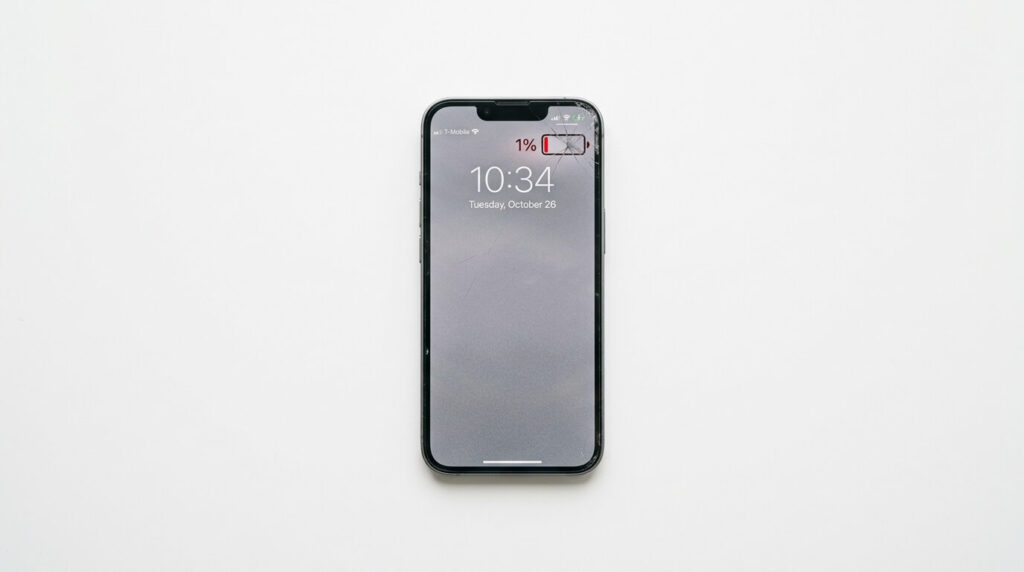
Your iPhone dies at 2 PM. Or it shuts off at 30% charge. Or it’s become so sluggish that tasks that used to take a second now take three. These aren’t random software glitches — in most cases, they’re your battery telling you it’s time to change.
iPhone batteries are consumable components. According to Apple’s support documentation, lithium-ion batteries are designed to retain up to 80% of their original capacity after approximately 500 full charge cycles under normal use conditions. For most people, that’s roughly 2 to 3 years of daily use before degradation becomes noticeable.
Quick Answer:
Your iPhone battery likely needs replacement if you’re experiencing rapid battery drain, unexpected shutdowns, significant slowdowns, overheating, physical swelling, or an inability to hold a charge when unplugged. The most reliable confirmation is Settings → Battery → Battery Health & Charging — if maximum capacity is below 80%, replacement is recommended.
We have a physical shop in Ocala, Florida, USA. We regularly deal with this kind of stuff. Usually, we get some familiar or similar issues with every iPhone battery. Here are the 7 Signs Your iPhone Battery Needs to Be Replaced, along with exactly how to confirm each one.
What Is iPhone Battery Health (And Why It Degrades)
iPhone Battery Health is Apple’s measure of your battery’s current maximum energy capacity compared to when it was new — expressed as a percentage. It’s accessible directly in iOS at Settings → Battery → Battery Health & Charging.
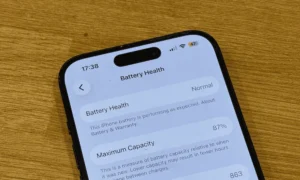
iPhone Battery Maximum Capacity:
Maximum capacity is the measure of your battery’s current energy storage compared to when it was new, expressed as a percentage. A battery at 85% maximum capacity can only store 85% of the charge it held originally, which directly reduces how long your iPhone lasts between charges.
The underlying reason batteries degrade is electrochemical. Inside a lithium-ion battery, charged ions shuttle between a graphite anode and a lithium metal oxide cathode every time you charge or discharge. Each cycle causes microscopic structural changes to those electrodes — tiny amounts of lithium become permanently trapped, unable to participate in future charge cycles. Over hundreds of cycles, this adds up to measurable capacity loss.
Quick Answer:
iPhone battery health percentage reflects how much of the battery’s original energy capacity remains. At 100%, the battery is new. Apple considers 80% the threshold for significant degradation and recommends battery service at or below that point. Below 80%, the battery can no longer reliably power the phone at peak demand.
One distinction most articles skip:
Maximum capacity and usable capacity are not the same thing. Maximum capacity is what iOS reports. Usable capacity is what the phone actually draws on — and it’s often slightly lower, because iOS reserves a buffer to protect battery cells from deep discharge. This means your effective runtime drops faster than the reported percentage suggests.
This is also where Peak Performance Capability becomes relevant. When a degraded battery can’t consistently deliver the power the processor needs, iOS activates performance throttling — deliberately slowing the CPU to prevent unexpected shutdowns. Apple’s documentation confirms this behavior was introduced in iOS 10.2.1 and later expanded.
How long does an iPhone battery last?
iPhone batteries are designed to retain up to 80% of their original capacity after approximately 500 full charge cycles under normal conditions. For most users, this equals 2–3 years of daily use before noticeable degradation begins.
Sign #1 — Your iPhone Battery Drains Unusually Fast
A healthy iPhone should comfortably last a full workday — typically 8 to 10 hours of screen-on time depending on usage. If your phone is consistently dead by mid-afternoon despite normal use, fast battery drain is the most common early sign of battery degradation.
Quick Answer:
iPhone battery drain is often caused by reduced maximum capacity. As the battery ages, it holds less total charge, which shortens the runtime proportionally. If the drain is severe and Battery Health is below 80%, the battery is the likely cause. Check Settings → Battery → Battery Usage by App to rule out a software issue first.
Here’s how battery capacity and runtime connect: if your battery’s maximum capacity has dropped to 75%, your phone effectively has 75% of the runtime it had when new, regardless of what the battery percentage indicator shows.
One mistake people often make is assuming fast drain always means a failing battery. Before replacing anything, go to Settings → Battery → Battery Usage by App. This screen shows which apps have consumed the most battery over the past 24 hours or 10 days. Occasionally, a single misbehaving app — a navigation app running in the background, a streaming app that never properly closed — accounts for most of the drain. Restarting the phone or deleting the offending app sometimes resolves the issue without any hardware repair.
If no rogue app is responsible and your Battery Health reads below 80%, degradation is the likely cause.
A note about iOS updates: a common misconception is that software updates damage the battery. What actually happens is that iOS sometimes recalibrates its battery reporting after an update, which can make the health percentage appear to drop temporarily. This is a reporting adjustment, not an actual capacity loss. If the drain persists for more than a week after an update, the battery — not the software — is the issue.
Sign #2 — Your iPhone Shuts Down Unexpectedly
Random shutdowns are one of the most disruptive signs of battery failure — and one of the most technically interesting. If your iPhone powers off at 30%, 40%, or even 50% charge, the battery isn’t lying about the percentage. It’s failing to deliver the electrical current the phone demands.

Quick Answer:
Unexpected iPhone shutdowns with battery remaining are typically caused by a rise in internal resistance within the degraded battery. When the phone demands a surge of current — for Face ID, camera, or GPS — the battery voltage drops below the minimum threshold needed to keep the device on, triggering an automatic shutdown even when the battery percentage appears adequate.
Here’s the physics behind it:
As lithium-ion cells age, their internal resistance increases. Resistance limits how quickly current can flow from the battery to the processor and other components. High-demand tasks — activating Face ID, launching the camera, loading GPS — require a sudden spike in current draw. If the battery can’t deliver that spike cleanly, voltage drops sharply, and the phone’s power management circuit cuts power to prevent damage to internal components. The result looks like the battery died, but the remaining charge was simply inaccessible at that moment.
This is specifically why Apple introduced iOS performance throttling after the “batterygate” controversy in 2017. By slowing the CPU, iOS reduces peak current demand, which prevents the voltage drops that cause shutdowns. It works — but it’s also a sign the battery needs attention. If throttling is active on your phone, that’s not a fix. It’s a workaround.
To distinguish a battery shutdown from a software crash: if the phone restarts normally and immediately shows remaining charge, it’s almost certainly a battery issue. If the phone shows an Apple logo for an extended time before booting, a software or hardware fault is more likely.
Sign #3 — Your iPhone Is Running Slow or Lagging
If your iPhone has become noticeably slower — apps take longer to open, Face ID hesitates, scrolling stutters — the cause may not be the software. It may be the battery.
Quick Answer:
iOS deliberately throttles CPU performance when the battery can no longer reliably deliver peak power. This is Apple’s mechanism to prevent unexpected shutdowns on devices with degraded batteries. Replacing the battery removes the throttling condition, often fully restoring the phone’s original speed.
Apple confirmed and expanded its performance management system following widespread reports in 2017. The mechanism works by capping the maximum CPU clock speed when the battery can’t sustain the current required for full performance. The result is measurably slower app launches, delayed biometric authentication, and reduced system responsiveness across the board.
Does replacing an iPhone battery improve performance?
Yes. iOS automatically applies performance throttling when the battery can’t sustain peak power delivery. Replacing the battery removes this throttling, restoring normal CPU speed, faster app launches, and improved responsiveness — often making an older iPhone feel like new.
Most readers don’t know there’s a way to confirm throttling is active. Go to Settings → Battery → Battery Health & Charging. If you see the message “Performance Management Applied” or a similar notice about reduced performance, iOS has already confirmed the battery is limiting your phone’s speed. This message only appears on iPhones that have experienced an unexpected shutdown due to battery issues.
A common mistake is assuming a slow iPhone needs a software reset or an upgrade. In many cases, a battery replacement at $49–$99 fully restores the performance of an iPhone that might otherwise seem due for replacement.
Sign #4 — Your iPhone Overheats While Charging or During Normal Use
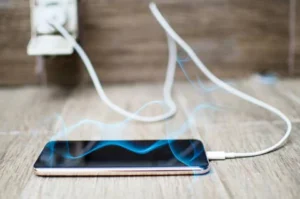
Some warmth during charging is normal. Lithium-ion batteries generate heat as part of the charge/discharge process, and heavy tasks like streaming video or running GPS can warm the device. What’s not normal is consistent, uncomfortable heat — especially during light use or overnight charging.
Quick Answer:
Excessive heat during iPhone charging or use often indicates a degraded battery. As internal resistance increases with battery age, the battery must work harder to accept and deliver charge, generating more heat in the process. This heat accelerates further capacity loss, creating a compounding degradation cycle.
The relationship between heat and battery degradation is bidirectional. Increased internal resistance in an aging battery causes more energy to be lost as heat rather than converted to usable charge. That heat then accelerates the chemical aging of the battery cells themselves, which increases resistance further, which generates more heat. Battery University, a widely referenced technical resource on electrochemical energy storage, notes that heat is one of the primary accelerants of lithium-ion capacity loss.
A practical note: if your iPhone regularly gets hot while charging, check your charger. Using a non-Apple, non-MFi-certified cable or adapter can cause inefficient charging that generates excess heat. This isn’t always a battery problem — it can be an accessory problem. Switch to an Apple-certified charger and see if the heat improves.
If the phone overheats alongside any visible physical deformation — a screen lifting from the frame or a bulge on the back — stop using it immediately. That combination points to a more serious issue covered in the next sign.
Sign #5 — Your iPhone Battery Is Swollen or Bulging
A swollen battery is not a performance issue. It is a safety issue.
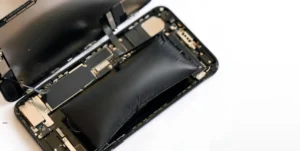
When lithium-ion cells break down chemically, they can produce gases — a process called off-gassing. Those gases have nowhere to go inside a sealed battery pouch, so the battery physically expands. The result is visible: the screen may lift away from the iPhone frame, the back may develop a noticeable bulge, or the display may appear to bow outward.
Quick Answer:
A swollen iPhone battery is a safety hazard caused by internal chemical breakdown and lithium-ion off-gassing. Do not continue charging or using the phone. Do not apply pressure to the battery. Bring it to a certified repair technician immediately. A swollen battery risks rupture, fire, or chemical exposure if punctured or further stressed.
According to the U.S. Consumer Product Safety Commission, lithium-ion batteries that are swollen, damaged, or showing signs of failure pose a genuine fire and chemical hazard. This isn’t a precautionary overstatement — thermal runaway events in damaged lithium-ion cells, while uncommon, have caused fires and injuries.
The downstream damage from ignoring a swollen battery is significant and often underreported. Pressure from the expanding battery can crack an OLED or LCD display from the inside, damage the logic board and power management ICs, and permanently compromise the water resistance seal around the display assembly. What starts as a battery problem can become a multi-component repair — or render the phone unrepairable.
Visual signs to check for:
The screen no longer sits flush with the frame; there’s a visible bulge on the back panel; the phone rocks when placed on a flat surface.
If you notice any of these, don’t charge the phone, don’t press on the affected area, and take it to a repair technician the same day. A certified technician will safely remove the swollen cell and can assess whether the display assembly or logic board sustained damage in the process.
Sign #6 — Your iPhone Only Works When Plugged In
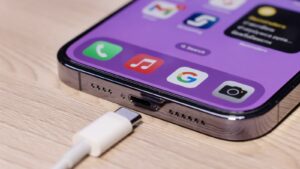
If your iPhone dies within minutes of being unplugged — or won’t power on at all without being connected to a charger — the battery has reached end-stage failure. Maximum capacity is typically below 70% at this point, and the battery can no longer hold enough charge to sustain the device independently.
Quick Answer:
An iPhone that only works when plugged in has reached end-stage battery failure. The battery’s maximum capacity is too low to power the device on stored charge. This requires urgent battery replacement, not optional maintenance. First, rule out a charging port issue: if the phone charges normally but dies instantly when unplugged, the battery is the cause.
Before concluding the battery is dead, do a quick diagnostic to rule out a charging port problem:
- Check if the phone charges consistently when plugged in — does the battery percentage increase?
- If yes, and the phone dies immediately when unplugged, the battery can’t hold a charge. Battery replacement is the fix.
- If the phone charges inconsistently, shows no charging indicator, or requires specific cable angles to charge, the issue may be a dirty or damaged Lightning port or USB-C connector. A can of compressed air or a careful clean with a dry toothpick sometimes resolves port debris. If not, port repair or replacement is needed separately.
At this stage, battery replacement is not optional. A battery that can’t store a charge does not protect against power loss during important calls, navigation, or emergencies.
Sign #7 — Your iPhone Battery Health Is Below 80%
Even without any obvious symptoms, a Battery Health reading below 80% is itself a sign that replacement is warranted. This is Apple’s own threshold, documented in Apple’s support materials, for when a battery is no longer performing at its designed capacity.
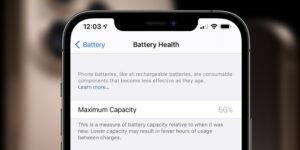
How to check your iPhone battery health:
- Open Settings
- Tap Battery
- Tap Battery Health & Charging
- Review the Maximum Capacity percentage
Quick Answer:
To check iPhone battery health, go to Settings → Battery → Battery Health & Charging. The percentage shown is your battery’s maximum capacity relative to when it was new. Apple considers anything below 80% significant degradation and recommends battery service. Performance throttling may activate at higher percentages if the phone has experienced unexpected shutdowns.
What your Battery Health percentage means:
| Health % Range | Battery Condition | Performance Impact | Recommended Action |
| 100% – 87% | Good | No throttling | Monitor over time |
| 86% – 80% | Moderate degradation | Possible throttling under load | Consider replacement soon |
| 79% – 70% | Poor | Likely throttling active | Replace the battery promptly |
| Below 70% | Critical failure | Severe degradation, potential shutdowns | Replace immediately |
Two messages to look for in the Battery Health & Charging screen:
- “Your battery’s health is significantly degraded” — Apple’s direct recommendation to replace the battery. This message typically appears when capacity drops to 79% or below.
- “Performance Management Applied” — Confirms that iOS has already activated CPU throttling on your device due to a previous unexpected shutdown. This means the battery is actively limiting performance right now.
What percentage should you replace an iPhone battery?
Apple recommends battery service when the maximum capacity drops below 80%. At this level, the battery has completed approximately 500 charge cycles and can no longer deliver consistent power, causing throttling, shutdowns, and reduced runtime.
Should You Replace the Battery or Buy a New iPhone?
Once you’ve confirmed the battery needs replacement, a reasonable question follows: Is it worth replacing, or is it time to upgrade?
Quick Answer:
iPhone battery replacement is typically worth it if the phone is under 4 years old and functions well aside from battery issues. Battery replacement costs $49–$99, compared to $699–$1,199+ for a new iPhone. If the phone has multiple hardware problems or is over 5 years old with outdated features, upgrading may be the better value.
Here’s a practical decision framework:
Replace the battery if:
- The phone is under 4 years old
- Performance was good before battery degradation
- No other hardware issues (screen, camera, Face ID, charging port)
- You don’t need features the current phone lacks (newer camera, specific iOS capabilities)
Consider buying a new iPhone if:
- The phone is 5+ years old with multiple hardware problems
- It no longer supports the latest iOS version (which affects security and app compatibility)
- Storage is consistently full and non-expandable
- The repair cost approaches the phone’s resale value
Should You Replace the Battery or Upgrade Your iPhone?
| Factor | Replace Battery | Buy a new iPhone |
| Cost | $49–$99 | $699–$1,199+ |
| Phone age | Under 4 years | 5+ years or end-of-support |
| Other hardware issues | None | Multiple problems |
| Performance after fix | Fully restored in most cases | New hardware baseline |
| Camera/feature needs | The current phone is sufficient | Need newer capabilities |
| Environmental impact | Extends device life, reduces e-waste | Adds to electronic waste |
One consideration that rarely gets mentioned: replacing a battery extends the usable life of a device that’s already manufactured. Apple’s own repair program and third-party repair shops collectively prevent thousands of functional phones from entering the waste stream prematurely. If the phone works well in every other way, replacing the battery is often the most practical and responsible choice.
How to Get Your iPhone Battery Replaced
There are two reliable paths for professional iPhone battery replacement in the United States, and choosing the right one depends on your priorities.
Quick Answer:
iPhone battery replacement is available through Apple Stores, Apple Authorized Service Providers, and reputable third-party repair shops. Apple charges $49–$99, depending on the model. Third-party shops typically charge $30–$80 and often offer same-day service. Ask any shop whether they use OEM-compatible batteries, whether they re-seal water resistance, and what warranty they provide on the repair.
Option 1: Apple Store or Apple Authorized Service Provider
Apple uses genuine Apple batteries and maintains your device’s water resistance rating after repair. Repairs are covered under warranty, and AppleCare+ members pay nothing out of pocket for battery replacement when capacity is below 80%. The downside: same-day availability isn’t guaranteed, and Apple’s service fees are generally at the higher end of the range.
Option 2: Reputable third-party repair shop
A well-reviewed local repair shop can typically complete battery replacement the same day, often at a lower cost. Quality varies — so the shop matters as much as the price.
Three questions to ask any third-party repair shop before handing over your phone:
- “Do you use OEM or OEM-compatible batteries?” A genuine Apple battery or a quality-compatible cell performs to spec. Unknown-brand cells from low-cost suppliers can have lower capacity than advertised and may cause the Battery Health menu to display inaccurate readings.
- “Do you re-seal the water resistance after the repair?” — Opening an iPhone breaks the adhesive seal that protects against water ingress. A professional shop replaces this seal as part of the service. If they don’t, your phone’s IP water resistance rating is no longer valid.
- “What warranty do you offer on the battery and the repair?” — Reputable shops typically offer 90 days to 1 year on parts and labor. No warranty is a red flag.
What to avoid: ultra-cheap mail-in services advertising battery replacements well below market rate. These services often use low-grade battery cells, don’t replace the water resistance seal, and are difficult to hold accountable if problems arise. But phone Fashion Fix is different. We provide the best quality oem grade battery to our customers along with 90 days of replacement warranty.
How to Extend Your iPhone Battery Life
The best time to start protecting your battery is before degradation becomes a problem. A few consistent habits make a measurable difference in how long your battery retains its capacity.
Quick Answer:
To extend iPhone battery life, enable Optimized Battery Charging in iOS Settings, keep the charge level between 20% and 80% when possible, avoid exposing the phone to extreme heat or cold, and use Apple-certified or MFi-certified chargers. These habits reduce the electrochemical stress that causes lithium-ion capacity loss over time.
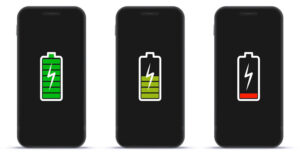
Enable Optimized Battery Charging
Go to Settings → Battery → Battery Health & Charging → Optimized Battery Charging. When enabled, iOS learns your daily charging routine and delays charging past 80% until shortly before you typically unplug the phone. This keeps the battery at lower charge states for longer, which reduces stress on the cells.
Keep charge between 20% and 80%
Here’s the chemistry behind this tip: lithium-ion cells experience the most electrochemical stress at the extremes of the charge range — both fully charged (100%) and fully depleted (below 10–15%). The reason is ion concentration: at full charge, the cathode is saturated with lithium ions and structurally strained; at deep discharge, the anode is nearly fully depleted. Repeatedly pushing to either extreme accelerates the structural degradation that reduces maximum capacity. Staying in the middle range reduces that stress.
Avoid heat above all else
Temperature is the single largest environmental factor in battery aging. Charging in direct sunlight, leaving the phone in a hot car, or running processor-intensive tasks in a hot room all accelerate lithium-ion degradation. Keep the phone below 95°F (35°C) during use and charging.
Use certified accessories
Use Apple-certified or MFi-certified chargers and cables. Uncertified accessories can deliver inconsistent voltage, generate excess heat, and in rare cases cause overcharging that damages the battery cells.
Reduce background activity
Go to Settings → General → Background App Refresh and disable it for apps that don’t need it. Similarly, review Settings → Privacy → Location Services and set apps to “While Using” rather than “Always.” Push email and frequent location polling are among the most consistent background battery consumers.
Frequently Asked Questions
How do I check the health of my iPhone battery?
Go to Settings → Battery → Battery Health & Charging. The percentage shown is your battery’s maximum capacity compared to when it was new. Apple also displays a direct service recommendation in this menu when replacement is warranted. Check this number first before assuming any battery-related symptom requires a hardware fix.
How much does an iPhone battery replacement cost?
Apple charges $49–$99 for battery replacement, depending on the iPhone model, as documented on Apple’s pricing page. AppleCare+ covers replacement at no additional cost when the maximum capacity is below 80%. Reputable third-party repair shops in the US typically charge $30–$80. Battery quality varies significantly between providers — avoid shops that can’t confirm the brand or spec of the battery they install.
Why does my iPhone battery health drop so fast?
Battery health degrades faster when you frequently charge to 100%, expose the phone to high temperatures, use non-certified chargers, or complete a high number of charge cycles in a short period. Enabling Optimized Battery Charging in iOS Settings is the most effective single step to slow degradation, as it limits the time the battery spends at full charge.
Can I replace an iPhone battery myself?
DIY replacement is technically possible using repair guides and tool kits available from resources like iFixit. However, it carries real risks: voiding any remaining warranty, permanently compromising water resistance if the adhesive seal isn’t properly replaced, potential damage from improper tools, and a genuine safety risk if the battery is mishandled during removal. For most users, professional replacement is the better option — the cost difference rarely justifies the risk.
Will replacing my iPhone battery fix random shutdowns?
In most cases, yes. Unexpected shutdowns are caused by the battery’s inability to deliver the surge of current needed during high-demand tasks. The voltage drops below the phone’s operating threshold, and the device powers off to protect itself. A new battery restores stable power delivery, eliminating the voltage instability that triggers the shutoffs.
How long does an iPhone battery replacement take?
Most Apple Stores and authorized repair shops complete iPhone battery replacement the same day, typically within 1 to 3 hours. Availability depends on whether the shop has the correct battery in stock for your model — calling ahead is worthwhile. Mail-in repair services generally take 3 to 7 business days, including shipping.
Is it worth replacing an iPhone battery at 80%?
It depends on your symptoms. Apple considers 80% the threshold for significant degradation, but 80% itself doesn’t automatically mean replacement is urgent. If your phone lasts a full day, runs smoothly, and isn’t shutting down unexpectedly, you can monitor it for now. However, if you’re noticing shorter runtime, sluggish performance, or random shutoffs at 80%, replacement is worth it — the battery will only continue to decline from here, and the cost is low compared to the performance gain.
What is the 20/80 rule for iPhone battery?
The 20/80 rule is a charging habit designed to slow battery aging. The idea is to avoid letting your iPhone drop below 20% charge or consistently charging it above 80%. Lithium-ion cells experience the most electrochemical stress at the extremes of the charge range — near full capacity, the cathode is structurally strained; near empty, the anode is heavily depleted. Keeping charge within the 20–80% window reduces that stress and slows the rate at which your battery loses maximum capacity over time. Apple’s Optimized Battery Charging feature automates part of this by limiting charge above 80% until shortly before you typically unplug.
Is 70% iPhone battery health bad?
Yes — 70% battery health is considered poor, and replacement is overdue at this point. At 70% maximum capacity, your iPhone is running on less than three-quarters of its original battery. You’ll likely experience noticeably shorter battery life, active CPU throttling slowing down the phone, and a higher risk of unexpected shutdowns during demanding tasks. Apple’s own Battery Health menu typically displays a direct service recommendation well before this point. If your battery is at 70%, don’t wait — replacement will make a meaningful difference in daily performance.
Is 76% good battery health?
No — 76% is not good battery health. It falls into the critical range where degradation is severe enough to affect performance and reliability noticeably. At this level, iOS has almost certainly applied performance throttling to prevent shutdowns, your runtime is significantly reduced, and the battery is operating well below Apple’s recommended service threshold of 80%. A phone at 76% battery health is a good candidate for immediate replacement, not continued monitoring.
What’s the average lifespan of an iPhone battery?
According to Apple’s support documentation, iPhone batteries are designed to retain up to 80% of their original capacity after approximately 500 full charge cycles under normal conditions. For most users charging once per day, that works out to roughly 2 to 3 years before the battery crosses Apple’s degradation threshold. Real-world lifespan varies based on charging habits, heat exposure, and usage patterns — users who follow the 20/80 charging rule, use certified chargers, and avoid high-temperature environments often see their batteries hold capacity closer to 3 to 4 years. After that point, replacement restores the phone to its original performance level.
Conclusion
Your iPhone battery is a consumable component — degradation isn’t a defect, it’s physics. After approximately 500 full charge cycles, which translates to 2 to 3 years for most users, capacity loss becomes noticeable and starts affecting daily performance.
Three things to take away from this:
- Battery degradation is fixable without buying a new phone. A $49–$99 battery replacement restores runtime, eliminates performance throttling, and resolves most random shutdowns on phones that are otherwise functioning well.
- Check your Battery Health percentage now. Go to Settings → Battery → Battery Health & Charging. If your maximum capacity is below 80%, you have confirmation — not just symptoms — that replacement is warranted.
- A swollen battery is never a “monitor and wait” situation. Physical swelling means the battery chemistry has broken down to the point of off-gassing. Stop charging, stop using the phone, and get it to a certified technician the same day.
If you’re seeing two or more of the signs in this article, a professional battery diagnosis is the next step. Most repair shops complete the service the same day, and the cost is a fraction of what a new iPhone would cost. [Book a Battery Replacement] — and get your phone back to the performance it had on day one.