

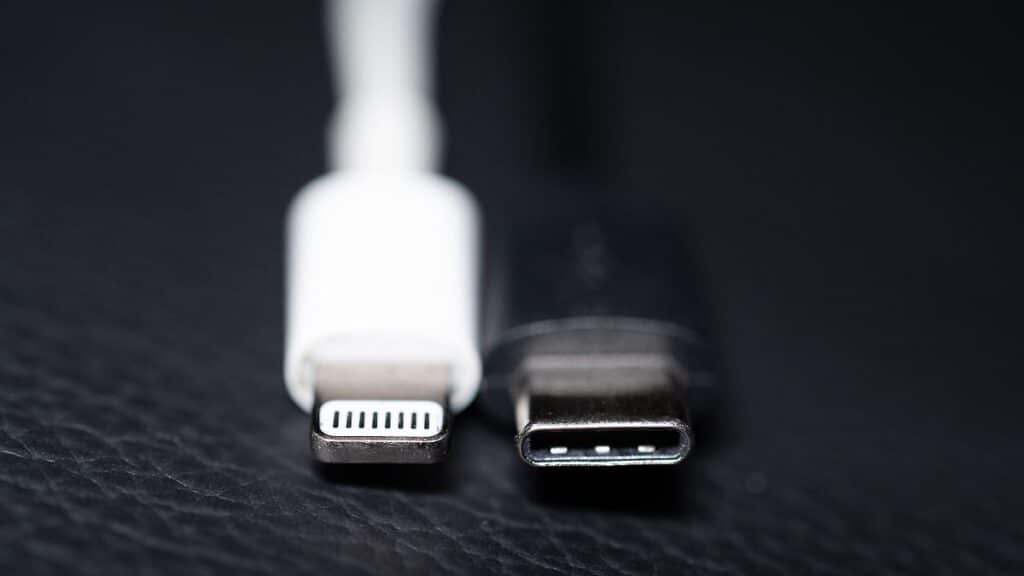
Anyone who’s dug through a drawer of tangled cables looking for the right one already knows the short version: Lightning and USB-C aren’t interchangeable, and the difference goes well past the shape of the plug. The Lightning Port vs USB-C comparison shows that USB-C moves data faster, delivers more charging power, and works with almost everything except older iPhones and iPads. Lightning still works fine—it just can’t keep up on raw speed or wattage, and Apple has been phasing it out since the iPhone 15.
What most comparisons skip is what happens when the port itself, not the cable, starts failing. A worn or damaged charging port is one of the most common reasons a phone or iPad ends up needing repair, and which connector your device uses changes what that repair actually involves.
Quick answer
USB-C
- Up to 40 Gbps data transfer.
- Up to 240W charging with USB Power Delivery.
- Open, reversible connector standard.
- Performance depends on the device’s USB specification.
Lightning
- Up to 480 Mbps data transfer.
- Typically 20–27W charging.
- Apple’s proprietary 8-pin reversible connector.
- Still works reliably on older Apple devices.
What’s the Real Difference Between Lightning and USB-C?
The two standards exist because they came from different design philosophies. Lightning was built by Apple, exclusively for Apple products, and accessory makers have to license Apple’s MFi certification to produce compatible cables and docks. That licensing is part of why official Lightning cables cost more than a generic USB cable — Apple controls both the connector and who’s allowed to build for it.
USB-C is the opposite approach. It’s an open standard developed by the USB-IF, a nonprofit group that includes Apple, Samsung, Intel, and most other major device makers. Anyone can manufacture USB-C cables and ports without paying a licensing fee, which is a big reason USB-C cables are typically cheaper and more widely available than Lightning ones.
One thing people often get wrong is assuming a Lightning cable and a USB-C cable are just different shapes carrying the same signal. They’re not. Lightning includes an authentication chip that verifies MFi compliance, which is why cheap, uncertified Lightning cables sometimes trigger warnings or charge unreliably — that check doesn’t exist in the same way on the open USB-C standard.
The practical difference: Lightning is a closed, Apple-only connector; USB-C is an open industry standard used across phones, laptops, cameras, and accessories from nearly every major manufacturer.
Charging Speed & Power Delivery Compared
USB-C generally charges faster than Lightning, mainly because of USB Power Delivery (USB-PD) — a protocol that lets a device and charger negotiate the highest safe voltage and current between them. The current USB-PD 3.1 spec supports up to 240W at the ceiling, though phones typically use only a fraction of that.
Lightning-equipped iPhones can use USB-PD too, through a Lightning-to-USB-C cable, but the connector itself limits how much power gets through. In practice, Lightning iPhones fast-charge around 20–27W depending on the model and adapter. iPhone 15 and 16 models with USB-C ports see similar real-world charging speeds in most cases, since the phone’s battery and charging circuitry — not just the port — set the actual ceiling.
| Metric | Lightning | USB-C |
| Charging protocol | USB-PD via adapter/cable, capped by connector | Native USB-PD, up to 240W at spec ceiling |
| Typical real-world phone charging | ~20–27W | ~20–30W depending on device and adapter |
| Reversible plug orientation | No | Yes |
A common issue is blaming a slow charge on the port when the cable is actually the bottleneck — a worn or low-quality cable can throttle charging speed even when the port and adapter both support faster charging.
Data Transfer Speed
Lightning is fixed at USB 2.0 speeds — a 480 Mbps ceiling — on every device that uses it, regardless of when that device was released. USB-C isn’t one fixed speed at all; it depends on which USB standard is implemented behind that specific port.
For example, the standard iPhone 15 and 16 models use USB-C ports that Apple has limited to the same 480 Mbps as Lightning, while the iPhone 15 Pro and 16 Pro models use USB-C ports capable of USB 3.0 speeds up to 10 Gbps. Some USB4 and Thunderbolt-equipped devices reach 40 Gbps.
| Device / Standard | Max Data Speed |
| Lightning (all generations) | 480 Mbps (USB 2.0) |
| iPhone 15/16 USB-C (standard models) | 480 Mbps (USB 2.0) |
| iPhone 15 Pro/16 Pro USB-C | Up to 10 Gbps (USB 3.0) |
| USB4 / Thunderbolt USB-C devices | Up to 40 Gbps |
This usually breaks people’s assumptions in one specific way: buying any USB-C cable and expecting the fastest possible transfer speed. The cable itself has to support the same underlying protocol as the port, or the connection drops to whichever link in the chain is slowest.
Compatibility: Which Devices Use Which Port
- iPhone: iPhone 14 and earlier (including 14 Plus, Pro, and Pro Max) use Lightning. iPhone 15 and every model since use USB-C.
- iPad: every iPad Apple currently sells — the base iPad, iPad mini, iPad Air, and iPad Pro — uses USB-C. Lightning only appears on older, now-discontinued generations, since Apple phased Lightning out across the iPad lineup between 2018 and 2022.
- AirPods: newer AirPods generations, including current AirPods Pro and standard models, ship with USB-C charging cases; several older AirPods generations used Lightning cases. Because case revisions vary by release date, check your specific model rather than assuming by product name alone.
Every current iPad model uses USB-C — Lightning only shows up on older, discontinued generations, so checking your exact model under Settings > General > About is the most reliable way to confirm.
Durability: Which Port Wears Out Faster?
Lightning and USB-C tend to fail in different ways, based on how each connector is built. Lightning’s pins sit recessed inside the port, which makes them more prone to collecting lint, dust, and pocket debris over time — that buildup is what usually causes intermittent charging or a cable that only makes contact at certain angles.
USB-C’s port is more open and exposed, and its internal pins are thinner. That makes it less prone to lint packing in, but more vulnerable to bent pins if a cable gets forced in at an angle or jammed in the dark — something USB-C’s reversible design doesn’t actually prevent, since orientation still matters for alignment even if either side will physically insert.
In our experience, most of the Lightning port issues we see involve lint or corrosion buildup rather than physical damage, while most of the USB-C port issues we see involve either a bent internal pin or, in worse cases, damage that reaches the board-level connector itself.
| Lightning | USB-C | |
| Most common failure mode | Lint/debris buildup, corrosion | Bent pins, connector or board damage |
| Fixable by cleaning alone? | Often, yes | Sometimes — bent pins usually aren’t |
| Physical fragility | Lower — recessed, simpler pin layout | Higher — thinner pins, more exposed |
A mistake we see often: assuming any charging problem is just debris that needs cleaning out. If a port has been forced or jammed at an angle, cleaning won’t fix a bent pin — that needs a technician’s attention.
Which Port Is More Expensive to Repair?
This is where the two connectors diverge most for anyone actually facing a repair decision. Lightning ports are frequently built as a separate, swappable flex-cable module rather than being soldered directly to the logic board — so if there’s no surrounding board damage, replacing the charging assembly is often a more straightforward, lower-labor repair.
USB-C ports on many newer iPhones are soldered directly to the logic board instead of sitting on a removable module. That typically means a damaged USB-C port more often requires board-level micro-soldering — a more specialized, time-intensive repair that generally costs more and needs more advanced equipment than a modular swap.
This depends heavily on the exact device and generation, since not every model follows the same internal design, and results can differ based on how much surrounding damage exists beyond the port itself.
- Lightning: usually a swappable flex-cable assembly → typically lower labor and cost
- USB-C: more often soldered to the logic board on newer models → typically higher labor if board-level work is needed
- Either connector: repair is usually still cheaper than replacing the device outright, assuming there’s no wider water or board damage
At Phone Fashion Fix, we diagnose the port before quoting a repair, since the same symptom — a phone that won’t charge — can point to two very different repair paths depending on which connector is involved.
Is It Your Cable or Your Port? Quick Diagnostic
Before assuming a port needs repair, a few quick checks can rule out the cheaper, simpler explanation:
- Try a different cable and charger you already know work on another device.
- Look inside the port with a flashlight for visible lint, dust, or corrosion.
- Gently wiggle the cable while it’s plugged in — if charging cuts in and out, that points to the port rather than the cable.
- Check whether data transfer also fails, not just charging. If both charging and syncing are unreliable with a known-good cable, the port is the more likely cause.
Also you can do, Swap in a cable and charger you know work, check for visible debris in the port, and see if the connection cuts out when the cable is wiggled — if the problem persists with known-good accessories, the port is the likely cause.
USB-C, Lightning & the EU Mandate: What’s Changing
The EU’s Common Charger Directive — officially Directive (EU) 2022/2380, an amendment to the Radio Equipment Directive — took effect on December 28, 2024, requiring most portable electronics sold in the EU, including phones, tablets, and cameras, to use a USB-C port built to the EN IEC 62680-1-3:2022 standard. Laptops follow under the same rules starting April 2026.
Apple shifted its entire iPhone lineup to USB-C starting with the iPhone 15 in 2023, ahead of that deadline. Long-term, this means existing Lightning accessories will keep working on the devices that use them, but new accessory production is shifting toward USB-C, so replacement Lightning cables and docks may become less common — and potentially pricier — over time.
Lightning vs USB-C at a Glance
| Feature | Lightning | USB-C |
| Introduced | 2012 | 2014 (USB-IF standard) |
| Max data speed | 480 Mbps (USB 2.0) | Up to 40 Gbps (USB4), varies by device |
| Max charging power | ~20–27W typical | Up to 240W (USB-PD spec ceiling) |
| Reversible | No | Yes |
| Governing body | Apple (proprietary, MFi licensed) | USB-IF (open industry standard) |
| Current device use | Older iPhones/iPads (pre-2023/pre-2022) | iPhone 15+, all current iPads, most non-Apple devices |
| Typical repair complexity | Often a swappable flex-cable module | More often soldered to the board on newer models |
| EU regulatory status | Being phased out | Mandated standard since December 2024 |
FAQ
Is USB-C actually faster than Lightning?
Yes. Lightning is capped at 480 Mbps regardless of device, while USB-C ranges from that same 480 Mbps on some standard-tier devices up to 10 Gbps or 40 Gbps on Pro-tier and USB4-equipped devices. The exact speed depends on which USB standard is implemented behind the port, not the connector shape itself.
Why did Apple switch from Lightning to USB-C?
Apple moved to USB-C starting with the iPhone 15 in 2023, ahead of an EU mandate requiring most portable electronics sold in the EU to use USB-C by December 2024. The switch also gave iPhones faster data transfer and let them share a charger with iPads, MacBooks, and most non-Apple devices.
Can you plug USB-C into a Lightning port?
No. The two connectors are physically different and won’t fit together without an adapter or a Lightning-to-USB-C cable. A certified adapter can bridge them, but there’s no direct plug-and-play compatibility between the two standards.
How do I know if my charging port is damaged?
Common signs include a cable that only charges at certain angles, intermittent or slow charging, visible lint or corrosion inside the port, and failed data transfers even when the cable works fine on another device. If a known-good cable and charger still don’t work reliably, the port is the more likely cause.
Can a charging port be repaired instead of replacing the phone?
In most cases, yes. Lint, corrosion, and minor bent pins are typically repairable, though the process differs by connector type — Lightning ports are often a swappable module, while USB-C ports on newer devices may need board-level work. Full device replacement is usually only necessary with wider water or board damage.
Does the iPad use Lightning or USB-C?
Every iPad Apple currently sells uses USB-C. Lightning only appears on older, now-discontinued iPad generations, so checking your specific model under Settings > General > About is the most reliable way to know for sure.
Will old Lightning accessories still be available?
Lightning accessories remain usable, but USB-C is replacing them, making Lightning options gradually less available and potentially more expensive.
Conclusion
USB-C wins on raw speed and charging power, but Lightning isn’t obsolete just because it’s being phased out — it still works exactly as intended on the devices that use it. Port damage on either connector is usually a repair, not a reason to replace the phone, though the repair path — and cost — depends on which connector and device generation is involved. Knowing your device’s exact port and generation also helps you avoid buying the wrong replacement cable.