

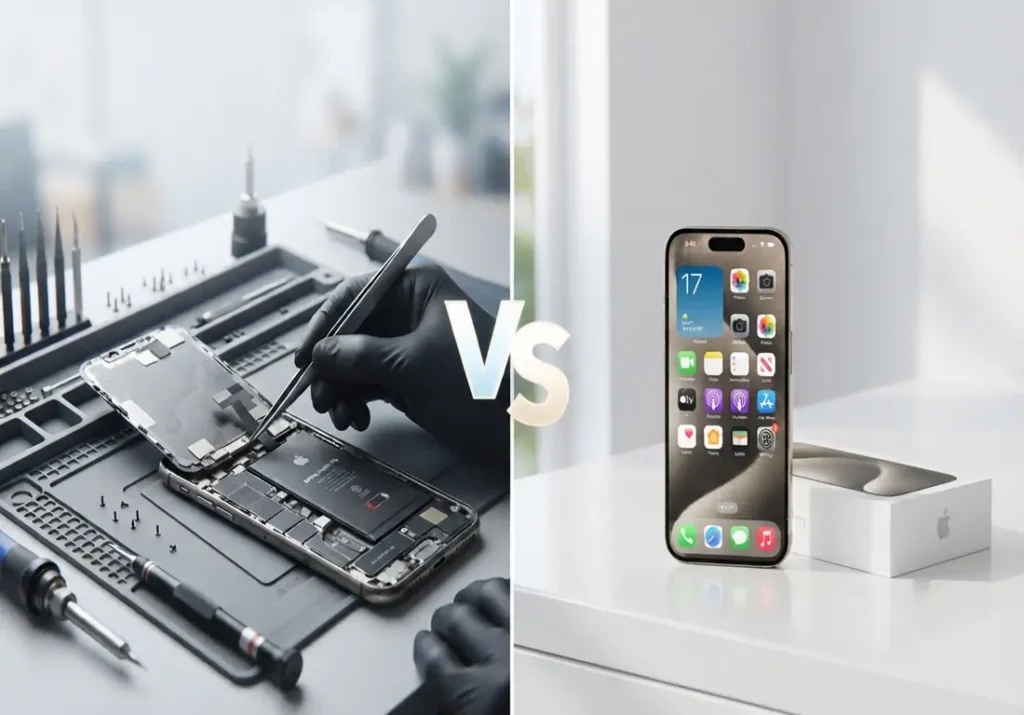
A dying iPhone battery and an aging iPhone often feel like the same problem, but they call for different fixes. Battery replacement vs new iPhone comes down to one question: is the battery the actual issue, or is the whole device falling behind? If battery health is under 80% and the phone is under 3–4 years old with no other issues, replacement wins on cost by a wide margin that changes once age or other hardware problems enter the picture.
The right call depends on three things: battery health percentage, device age, and whether anything else is starting to fail. A battery replacement typically costs a fraction of a new iPhone and solves the exact problem at hand reduced battery life and performance throttling. Treating that as a blanket rule in every case, though, can waste money in either direction.
Should You Replace Your Battery or Buy New?
If your iPhone’s battery health is below 80%, the device is under 3–4 years old, and nothing else is failing, replacing the battery is nearly always the cheaper and more effective option it typically costs well under $150 and restores near-original performance. If your iPhone is older, has multiple hardware issues, or is close to losing iOS update support, putting that money toward a new iPhone makes more sense long-term.
Why iPhone Batteries Degrade
Battery Health, as Apple defines it, is the measurement of your battery’s current maximum capacity compared to when it was new found in Settings > Battery > Battery Health & Charging.
Every iPhone uses a lithium-ion battery, and lithium-ion cells lose a small amount of maximum capacity with every full charge cycle. This is a chemical process, not a defect it happens even with careful charging habits. According to Apple’s support documentation, iPhone batteries are designed to retain a high percentage of their original capacity for a set number of complete charge cycles, and capacity naturally declines beyond that point.
The practical effect shows up as voltage sag: an aging battery can’t always deliver peak power the moment your phone needs it, especially when the CPU is under heavy load. To prevent an unexpected shutdown when this happens, iOS applies performance management the throttling people notice as “my iPhone got slow.” This isn’t Apple intentionally slowing older phones to push upgrades; it’s a safeguard tied directly to battery condition, and it’s one Apple has stated is not intended to shorten the useful life of your device.
One mistake people often make here is assuming a slow iPhone always means it’s time for a new phone. In many cases, the slowdown is entirely battery-related and disappears completely after a replacement.
iPhone batteries degrade through normal charge-cycle wear, and once capacity drops far enough, iOS throttles performance to prevent shutdowns a battery replacement addresses this directly without touching the rest of the phone’s hardware.
Signs Your Battery (Not Your Phone) Is the Problem
The clearest sign is a Battery Health reading below 80% in Settings, paired with a “Peak Performance Capability” note indicating performance management is active. Beyond that number, three symptoms point specifically to the battery rather than a broader hardware issue: unexpected shutdowns even when the display shows 20% or more remaining charge, noticeably faster drain over just a few hours of light use, and the phone feeling sluggish only when it’s not plugged in.
This is different from symptoms tied to other components. A phone that’s slow even while charging, or that has display flickering, distorted speakers, or a swollen back panel, is likely dealing with something beyond the battery a failing logic board, a damaged display assembly, or in the case of swelling, a battery that’s failed in a way that needs immediate professional attention rather than a routine swap.
A common issue is customers assuming a cracked screen or a sticky charging port is “probably the battery too.” It usually isn’t. Each of these is a separate component with its own failure pattern, and treating them as one problem can lead to paying for a battery replacement that doesn’t actually fix what’s bothering you.
Battery health below 80% combined with early shutdowns or rapid drain during normal use are the direct signs your battery specifically needs replacing, separate from screen, charging port, or other hardware problems.
iPhone Battery Replacement Costs
Apple’s out-of-warranty battery replacement pricing is tiered by model: older models like the iPhone SE and iPhone 8 typically run around $69, most models from the iPhone X through the iPhone 13 series run around $89, and current-generation models including the iPhone 15 and 16 series run around $99, with the highest-end Pro and Air models priced closer to $119. If you have AppleCare+ and your battery health has dropped below 80%, the replacement is covered at no charge worth checking before paying full price.
Independent repair shops, including Phone Fashion Fix, typically price battery replacements below Apple’s out-of-warranty rates, often in the $69–$129 range depending on the model, usually with same-day turnaround and no appointment backlog. The trade-off to understand: non-Apple batteries can trigger an “Unknown Part” notice in Battery Health, which is purely informational it doesn’t affect how the phone charges or performs, but it’s worth knowing about upfront rather than being surprised by it later.
Expect to pay roughly $69–$119 for an Apple Store battery replacement or a comparable range at an independent shop in 2026, with AppleCare+ covering the cost entirely if your battery health is under 80%.
New iPhone Cost & What You’re Really Paying For
As of 2026, Apple’s current lineup starts at $599 for the iPhone 17e, $699 for the iPhone 16, $799 for the base iPhone 17, and climbs to $1,099–$1,199 for the Pro and Pro Max models. Every tier above the entry point buys you a better camera system, a faster chip, and in some cases a larger display genuine upgrades, but not necessarily ones that solve the problem you started with.
The practical difference is this: a battery replacement fixes battery life and eliminates performance throttling. A new iPhone does that too, but it also comes with camera, chip, and display changes you may not need if your only complaint was battery life. If your iPhone otherwise runs everything you use it for without issue, the extra $500–$1,000+ is paying for capability you might not use daily, not for solving the specific problem in front of you.
Where a new iPhone earns its cost is the software support window newer models get more years of guaranteed iOS updates ahead of them, which matters if your current device is already several years old and closer to the end of its update cycle regardless of battery condition.
New iPhone pricing in 2026 ranges from $599 to $1,199 depending on tier, and while it includes camera and performance upgrades, those upgrades don’t specifically address battery-related slowdowns the way a direct replacement does.
Cost-Per-Month Comparison
Looking at price alone doesn’t tell the full story what matters is cost relative to how many additional months of use you get. These are typical planning estimates based on average device lifespans; actual results vary by model, usage, and how well the rest of the phone is holding up.
| Option | Upfront Cost | Typical Extra Months of Use | Approx. Cost Per Month |
| Battery Replacement (Apple Store) | $69–$119 | 18–24 months | $3–$6 |
| Battery Replacement (Independent Shop) | $69–$129 | 18–24 months | $3–$6 |
| New iPhone (Entry: 17e) | $599 | 48–60 months | $10–$12 |
| New iPhone (Pro/Pro Max) | $1,099–$1,199 | 48–60 months | $18–$22 |
The gap narrows over a long enough timeline, but for anyone deciding right now, a battery replacement produces a lower cost-per-month in the near term for a device that’s otherwise in good condition the new-phone math only pulls ahead if your current iPhone is nearing the end of its useful life for reasons beyond the battery.
Decision Framework: Which Should You Choose?
The clearest way to decide is to combine three factors: battery health percentage, device age, and whether any other hardware issue is present.
| Battery Health % | Device Age | Other Symptoms | Recommendation |
| Below 80% | Under 3 years | None | Replace battery |
| Below 80% | 3–5 years | Minor (cosmetic wear only) | Replace battery |
| Below 80% | 5+ years | Multiple (screen, charging port, camera) | Consider new iPhone |
| Above 80% | Any age | Slowness unrelated to battery | Investigate other causes first |
| N/A | 5+ years | Losing iOS update eligibility soon | Consider new iPhone |
The rule in one sentence: if your battery health is below 80% and your iPhone is otherwise in good working order, replacement is almost always the financially smarter move; once a device is old enough to be losing software support or has more than one failing component, the calculation shifts toward a new iPhone.
A tradeoff worth naming: this framework assumes you plan to keep using the phone for at least another year. If you’re likely to upgrade within the next few months regardless, a battery replacement may not be worth it even at a low price, since you won’t recoup the value of the fix.
Combine battery health under 80%, device age under 5 years, and the absence of other hardware failures when all three line up, battery replacement is the clear financial winner over buying new.
When Buying a New iPhone Actually Makes More Sense
Repair isn’t always the right answer, and it’s worth being upfront about when it isn’t. A device with multiple simultaneous hardware issues a failing battery alongside a cracked screen, a worn charging port, or camera problems often costs more to fully restore piece by piece than the value of the device justifies, even if each individual repair is affordable on its own.
Age matters independently of battery health too. Once an iPhone is old enough that it’s approaching the end of Apple’s iOS update window, a battery replacement extends the life of a device that will soon stop receiving security updates and new app compatibility a real limitation that a fresh battery doesn’t solve.
A history of water damage is another case worth flagging. Even if the phone currently works, prior liquid exposure can cause corrosion that leads to unrelated failures months later, making a battery replacement a shorter-term fix than it appears on paper.
What matters most here is being honest about the full picture rather than defaulting to the cheaper option in every case. This depends on your specific device’s condition, and a quick diagnostic check before committing to either path is the more reliable way to decide than guessing from symptoms alone.
Buying new makes more financial sense than repair when a device has multiple hardware failures at once, is nearing the end of its iOS update eligibility, or has a water damage history that makes future failures likely.
FAQs
Is 80% battery health bad for an iPhone?
Not an emergency, but a clear signal. Apple’s own guidance treats 80% maximum capacity as the threshold where performance impact becomes noticeable, and it’s the point where planning a replacement rather than waiting for symptoms to worsen starts to make sense.
Does Apple replace iPhone batteries for free?
Only under specific conditions. If you have AppleCare+ and your battery health has dropped below 80%, replacement is covered at no cost. Without that coverage, you’ll pay Apple’s standard out-of-warranty pricing based on your model.
Will a new battery make my iPhone faster?
It resolves throttling-related slowness caused by battery degradation, since iOS removes performance management once a healthy battery is installed. It won’t add new features, improve the camera, or speed up tasks that were already limited by the phone’s chip rather than its battery.
How long does an iPhone battery replacement take?
At Phone Fashion Fix, most battery replacements are completed same-day, often within an hour, without needing an appointment. Turnaround can vary slightly by model due to differences in how each iPhone generation is assembled internally.
Is it better to repair or sell my old iPhone?
It depends on the device’s overall condition. A battery-only issue on an otherwise healthy phone is usually worth repairing, since replacement cost is low relative to resale value. A phone with multiple failing components may be worth more sold as-is or traded in than repaired piece by piece.
How many charge cycles does an iPhone battery last?
Apple’s official specifications state that iPhone batteries are designed to retain a high percentage of original capacity through a set number of complete charge cycles under normal conditions, after which capacity decline becomes more noticeable figures that vary by iPhone generation and are listed in Apple’s support documentation for each model.
Conclusion
Three things determine which option actually saves you money: your current battery health percentage, how old your iPhone is, and whether anything else on the device is showing signs of failure. When battery health is under 80% on a phone that’s otherwise in good shape, replacement wins on cost every time. When age or multiple hardware issues enter the picture, that math changes.
The fastest way to know where you stand is a 30-second check in Settings > Battery > Battery Health & Charging, followed by a professional diagnostic if you’re unsure whether other components are involved.
For those in Ocala, Florida and searching for iPhone battery replacement near me, Phone Fashion Fix is the trusted local destination for fast, professional, and affordable battery replacement services. Contact us today and get your iPhone back to full power.